Run an academy from course idea to verified learner outcome.
Academy LMS gives the people who run learning one connected place to create courses, teach, assess progress, award proof of completion, and improve the next cohort.
What the application does
It is a role-based learning platform. Academy administrators set policy and oversee outcomes. Instructors create curriculum and support learners. Learners study, complete assessments, and receive certificates. Reviewers, support staff, guardians, and corporate managers see only the work and data their role permits.

Who uses which work area
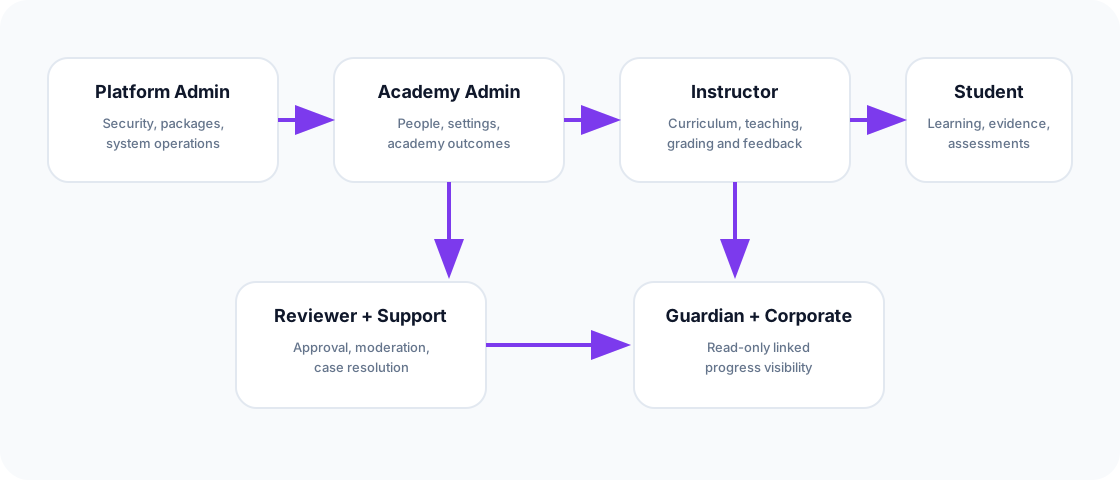
Use this work area for people, policies, academy defaults, reports, certificates, commerce, and operational decisions.
Use Course Studio to shape curriculum, lessons, resources, assignments, assessments, review state, and publishing.
Use the learner workspace for protected lessons, progress, tutor support, assessment attempts, feedback, and certificates.
Use reports, activity logs, notifications, automations, and support workflows to find and resolve problems early.
Typical work
- Launch an academy: configure the application, choose launch defaults, create the first administrator, and lock the installer.
- Build and approve a course: an instructor authors curriculum; reviewers approve publication while the previous public version stays protected.
- Teach and assess: learners complete server-authoritative progress, quizzes, and assignments; staff release feedback and results.
- Prove completion: eligible learners receive a certificate with public verification.
- Operate responsibly: staff inspect scoped reports, secure payments, support cases, and idempotent automations.