Role Dashboards
The generic dashboard redirect sends each user to a role-specific workspace. This proves the LMS is usable by operators, academy owners, teachers, reviewers, support teams, corporate managers, guardians, and learners without mixing their workflows.

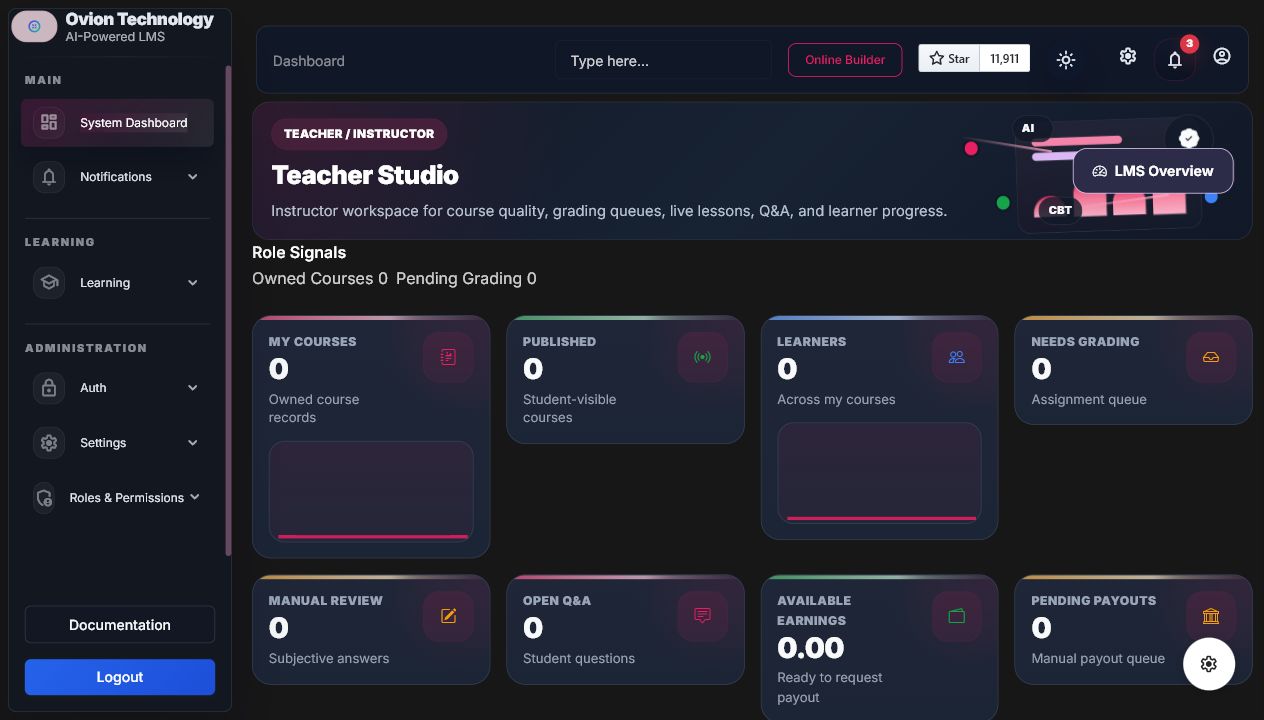
Workflow
- User signs in through /dashboard.
- The dashboard router chooses the highest LMS role route.
- The dashboard service loads scoped KPIs, charts, action links, and empty states.
- Staff users with learner access can use View as Learner without leaking another user's data.
Important Screens
| Role | Route | What it proves |
|---|---|---|
| Admin/Super Admin | /dashboard/system | Platform health, SaaS, AI, revenue, certificates, reports, and automations. |
| Academy Admin | /dashboard/academy | Academy-scoped health, instructors, learners, course quality, moderation, and commerce. |
| Teacher/Instructor | /dashboard/teacher | Owned courses, grading queue, student progress, Q&A, tutor confusion, and earnings. |
| Reviewer/Moderator | /dashboard/reviewer | Approvals, question review, flagged content, certificate approvals, and tutor flags. |
| Support Staff | /dashboard/support | Access issues, failed payments, certificate help, AI failures, notifications, and activity logs. |
| Corporate Manager | /dashboard/corporate | Team progress, at-risk learners, compliance, certificates, and assessment bands. |
| Guardian | /dashboard/guardian | Read-only linked learner progress and certificate state. |
| Student | /student/dashboard | Continue learning, progress, live lessons, certificates, notes, assignments, quizzes, and tutor. |
Demo Checklist
- Confirm
/dashboardredirects per role priority. - Confirm academy and instructor scopes do not leak other academy records.
- Confirm dashboard charts use LMS data, not generic placeholders.
- Confirm empty production data renders polished empty states.
Demo And Developer Notes
Operational exampleStart on System Dashboard with an authorized administrator, then verify Teacher and Student routes resolve to different scoped workspaces.
Developer noteDashboards use role-specific routes under
/dashboard/*. Admin and Super Admin should see everything; scoped roles must remain permission/academy limited.