From website visitor to confirmed stay
Website Builder and Direct Booking
The public website presents the hotel, rooms, offers, policies, gallery, and contact information. The booking journey checks real hotel availability and creates a reservation through a protected session.
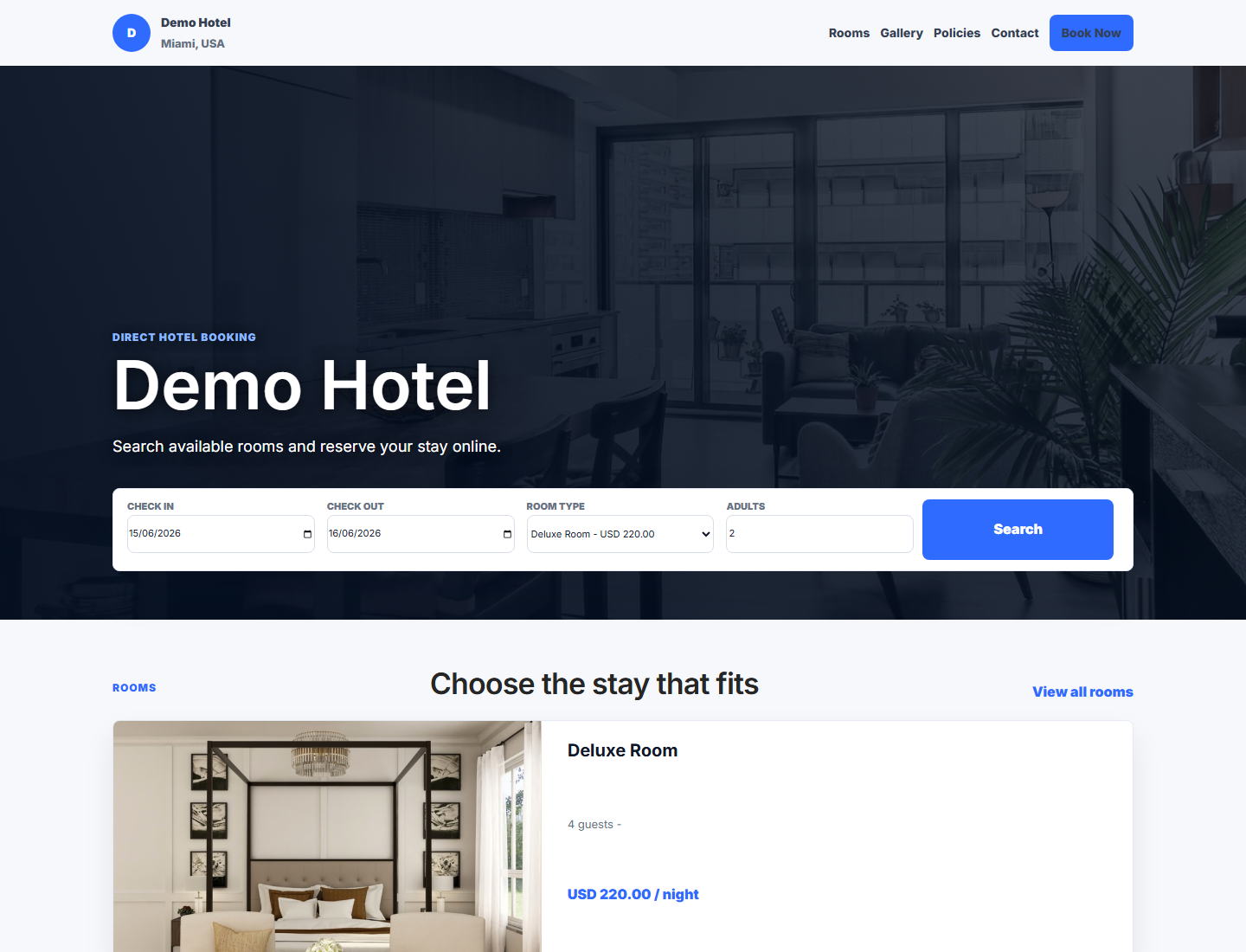
Real public booking page from the packaged application. Replace demo copy and media before production launch.
Before Publishing
- Hotel name, legal name, address, phone, email, timezone, currency, check-in/out times, and tax policies are correct.
- Every public room type has current capacity, amenities, description, bed information, price/rate availability, and licensed images.
- Cancellation, deposit, child, pet, smoking, accessibility, privacy, and payment policies are written in plain language.
- HTTPS, production email, payment webhooks, queues, scheduler, and public rate limits are working.
- Test one successful and one declined/abandoned booking without using real guest or card data.
Website Builder Sections
| Area | Purpose | Good content example |
|---|---|---|
| Homepage sections | Introduce location, value, room options, and direct-booking action. | “Quiet airport hotel with 24-hour reception and free shuttle.” |
| Rooms | Help a guest choose the correct room type. | Capacity, beds, size, accessibility, amenities, refundable terms |
| Offers | Present a real package or seasonal value. | Three-night family stay with breakfast; valid dates and exclusions |
| Gallery | Set accurate visual expectations. | Current room, bathroom, lobby, restaurant, entrance, and accessibility images |
| Policies | Explain terms before payment. | Cancellation deadline, deposit, taxes, child policy, check-in identification |
| SEO | Help search engines and shared links describe the page. | Unique page title, description, canonical URL, and social image |
| Languages | Offer approved translated content. | English and Spanish pages reviewed by the hotel |
Room Type Field Guide
| Field | What the guest needs | Avoid |
|---|---|---|
| Name | A short recognizable room category. | Internal codes such as “DLX-K-01”. |
| Capacity | Maximum adults/children and whether extra beds are possible. | Marketing a capacity the room cannot safely support. |
| Bed configuration | Exact beds and sizes. | “Multiple beds” without specifics. |
| Amenities | Only amenities genuinely available for this room type. | Copying hotel-wide amenities into every room. |
| Images | Representative current photographs. | Unlicensed stock photos or materially different rooms. |
| Rate and taxes | Clear price basis, included taxes/fees, meal plan, and cancellation terms. | Hidden mandatory charges. |
Guest Booking Journey
- The guest chooses valid arrival/departure dates and occupancy.
- Availability excludes overlapping reservations, maintenance holds, and non-sellable inventory.
- The guest selects a room/rate and enters primary contact and occupant information.
- The checkout page shows price, taxes, deposit/payment requirement, cancellation policy, and consent.
- The system creates/updates the protected booking session and calls the configured payment flow when required.
- Only verified payment/provider status can mark paid. The confirmation page and email show the booking reference and next steps.
Checkout fields
| Field | Why it matters | Example |
|---|---|---|
| Primary guest | Controls booking communication and identity. | Aisha Rahman |
| Email / phone | Confirmation, pre-arrival, payment, and support. | Verified guest-owned contact |
| Occupancy | Capacity, price, safety, and registration. | 2 adults, 1 child aged 8 |
| Special request | A request, not an automatic guarantee. | Quiet room if available |
| Policy consent | Records agreement to displayed terms. | Cancellation and privacy consent version |
Payment Behavior
- Use live provider mode only with production credentials, HTTPS, and verified webhooks.
- Manual/demo payment must remain disabled in production.
- A successful browser redirect is not enough; verify the provider response/webhook.
- Duplicate provider events must remain idempotent and must not create duplicate payments or bookings.
- Never collect card numbers through hotel notes, email, chat, or an unencrypted form.
Manage Website Bookings
Open Website Bookings to review the reservation, guest, room/rate, payment state, source, and timeline. Treat public bookings like other reservations after creation: resolve room assignment, deposit, guest details, arrival handover, and confirmation. Do not create a duplicate booking when a payment is pending; inspect the existing booking session first.
Guest Communication
- Confirmation: booking reference, dates, room/rate, payment status, hotel contact, check-in requirements, and policies.
- Pre-arrival: transport, arrival time, online forms, outstanding deposit, and useful hotel information.
- Changes/cancellation: what changed, any financial effect, and who initiated it.
- Never include private staff notes, full payment credentials, API tokens, or another guest's information.
Example: Direct Family Booking
Two adults and two children, three nights
The guest searches exact dates and four-person occupancy. Only room types with sufficient capacity are shown. The guest chooses a family room with breakfast, enters all required contact/occupancy details, reviews cancellation and deposit terms, and pays through the configured provider. The verified result creates a website-source reservation and confirmation. Reception later assigns an inspected room and completes the normal arrival workflow.
Public Booking Troubleshooting
| Symptom | Check |
|---|---|
| No rooms available | Date order, occupancy, room-type inventory, overlapping bookings, holds, restrictions, and rates. |
| Payment completed but booking pending | Provider webhook/signature, queue, idempotency record, booking session, and application logs. |
| Confirmation email missing | Guest email, mail configuration, queue worker, template, and delivery log; do not expose mail credentials. |
| Image missing | Private/public disk choice, supported file type, storage link for public media, and current page assignment. |