Plain-English Buyer Guide
This guide explains InsightPilot in simple language. It is written for buyers, business owners, admins, and support teams who want to install the app, connect a database, ask questions, review documents, and share reports without reading the source code.
Who This Guide Is For
| Reader | What You Should Read | What You Can Skip |
|---|---|---|
| Business owner | Overview, first setup, Ask Data, dashboards, reports, documents, safety. | Developer extension points. |
| Non-technical admin | Installation, OpenAI settings, mail settings, roles, demo data, troubleshooting. | Service classes and tests. |
| Analyst | Data connections, schema explorer, Ask Data, saved queries, dashboards, anomalies. | Installer internals. |
| Developer | All sections, then Customization and service extension points. | Nothing important. |
| Support agent | Troubleshooting, safe database rules, email, OpenAI, cron, common errors. | Sales positioning. |
The Simple Idea
Most companies already have useful data in a database and important rules inside documents. The problem is that owners and managers usually cannot easily ask that data questions like "Which products sold best this month?" or "Does customer X violate rule 7 of this contract?" InsightPilot gives them a controlled admin panel for that work.
The app does not replace the customer's existing business system. It connects to it safely, reads approved data, and helps users understand what is happening.
- Stores users, settings, roles, dashboards, saved queries, logs, reports, and app records.
- This database belongs to InsightPilot itself.
- Created during installation.
- The customer's POS, CRM, ecommerce, HR, booking, SaaS, or ticketing database.
- Connected later from Data Connections.
- Should use a read-only database user.
Why Not Just ChatGPT?
ChatGPT can explain a piece of data when someone manually pastes it into a chat. InsightPilot is different because it controls the workflow around the answer: approved database connections, schema discovery, SQL safety checks, certified metric versions, document citations, review decisions, governance records, exportable evidence, and private-by-default team sharing.
BI Companion, Not Enterprise BI Suite Replacement
InsightPilot is best understood as a trust-first BI companion for Laravel products. It strengthens safe SQL analytics, certified metric proof, document citations, collaboration reviews, governance evidence, and exportable proof. It does not try to replace dedicated enterprise BI suites such as Power BI or Tableau.
Updated audit ratings: Semantic metric maturity 9.0/10, Collaboration maturity 8.8/10, Enterprise BI replacement strength 6.8/10, and Enterprise BI companion strength 8.7/10. Direct guarded SQL supports MySQL/MariaDB, PostgreSQL, SQL Server, Redshift, Snowflake, and BigQuery; managed sync supports CSV, Google Sheets, Stripe, HubSpot, and GA4.


Who Usually Benefits Most?
- Agencies: create a client analytics portal with demo data, branded reports, and safe database access.
- SaaS founders: answer MRR, ARR, churn, expansion, and customer-success questions without exposing raw SQL.
- Finance ops: monitor revenue, refunds, margin, receivables, anomalies, and executive reports from certified metric definitions.
- Compliance-heavy teams: connect contract citations, approval trails, governance evidence, and exports for review.
Important Terms In Simple Words
| Term | Meaning | Example |
|---|---|---|
| OpenAI API key | A private key that allows the app to ask OpenAI for AI-generated answers. | Entered in Settings -> OpenAI. |
| Model | The AI model name the admin chooses. | The app does not guess this. Admin must enter it. |
| Schema | The list of tables and columns inside a database. | customers, orders, products. |
| Whitelist | The tables and columns that are allowed for AI and SQL. | Allow orders.total, block users.password. |
| SQL | The database query language used to read data. | select total from orders limit 50. |
| SQL Guard | The safety layer that blocks dangerous SQL before it runs. | Blocks DELETE, UPDATE, DROP, hidden tables, and multiple statements. |
| Citation | A source reference that proves where an answer came from. | Document name, rule number, snippet, SQL query, row sample, timestamp. |
| Executive brief | A scheduled summary report sent to managers or owners. | Weekly sales changes, risks, opportunities, actions. |
First 30 Minutes After Buying
- Upload the project to hosting or a VPS.
- Point the website to the
publicfolder. - Create a blank MySQL database for InsightPilot.
- Open
/install. - Complete the installer and create the admin account.
- Choose demo data if you want to see the product immediately.
- Log in as admin.
- Open Settings -> OpenAI and enter the API key and model.
- Open Settings -> Mail and send a test email.
- Open Data Connections and connect the first external MySQL/MariaDB, PostgreSQL, or SQL Server database.
- Open Schema Explorer, refresh schema, hide sensitive tables, and enable safe business tables.
- Open Ask Data and ask a simple question.
Installation, Explained Simply
Before Upload
- Ask hosting support if PHP 8.2+, MySQL, Composer, and required PHP extensions are available.
- Make sure the domain can point to the
publicfolder. - Create a new empty database for the app.
- Keep the database name, username, password, and host ready.
Installer Steps
| Installer Step | What It Does | Plain-English Tip |
|---|---|---|
| Requirements | Checks server features. | If something is red, ask hosting support to enable it. |
| App setup | Saves app name, URL, timezone, and locale. | Use your real domain URL. |
| Database setup | Connects the app to its own database. | This is not the customer business database yet. |
| Migrations and seeders | Creates app tables and required roles/settings. | Choose demo data for a live preview. |
| Mail setup | Stores SMTP settings. | Use the test button before scheduled reports. |
| Admin account | Creates the first admin user. | Use a strong password and real email. |
| Finish | Locks installer and opens login. | Do not leave installer unlocked. |
Settings You Should Configure First
- API key: required for live AI generation.
- Model: required. There is no default model.
- Timeout: how long the app waits for AI.
- SQL row limit: maximum rows returned by query runs.
- SMTP host, port, username, password, encryption.
- From email and from name.
- Test email before scheduled executive briefs.
- Mail must work before report emails can send.
Connect A Business Database
Open Data Connections. Add the external database details:
- Connection name: a friendly name like "Main POS Database".
- Database type: MySQL/MariaDB, PostgreSQL, or SQL Server.
- Host: usually an IP address, domain, or
localhost. - Port: usually
3306for MySQL,5432for PostgreSQL, or1433for SQL Server. - Database name: the exact database name.
- Username: recommended read-only database user.
- Password: stored encrypted.
PostgreSQL uses the public schema by default and can opt into configured schema lists. SQL Server requires the server to have the Microsoft PHP drivers and pdo_sqlsrv extension installed.
Click Test Connection. If it passes, save and activate the connection.
If The Test Fails
- Check the host and port.
- Confirm the username and password.
- Ask hosting support if remote database access or the SQL Server PHP driver is blocked.
- Confirm the database user has SELECT permission.
- Make sure the external database server allows this app server to connect.
Schema Explorer, Explained Simply
After connecting a database, InsightPilot needs to understand the structure. That means it reads table names, column names, primary keys, and relationships.
- Open Schema Explorer.
- Select the connection.
- Click Refresh Schema.
- Hide system tables, auth tables, logs, tokens, password tables, and private tables.
- Give business-friendly labels to useful tables.
- Enable only useful non-sensitive columns for AI.
customers can be labeled "Customer Records". A column named total_amt can be labeled "Order Total".
Ask Data, Step By Step
- Open Ask Data.
- Select the database connection.
- Type a business question like "What were my top selling products this month?"
- Click Generate.
- Review the SQL preview and explanation.
- Check the safety status. Run only if it is safe.
- View the result table, chart, explanation, and recommended actions.
- Save useful questions as Saved Queries.
- Add important saved queries to a dashboard.
Good Questions To Ask
- What were my top selling products this month?
- Which customers bought the most?
- Show revenue by category for this week.
- Which branch had the highest refunds?
- Which products are trending down?
- Compare this month revenue with last month.
Questions That Need More Detail
- "Show everything." This is too broad.
- "Why is business bad?" The app needs a specific metric, time period, or table.
- "Delete old records." InsightPilot blocks write actions and only allows safe read-only queries.
How SQL Safety Works
InsightPilot does not blindly run AI-generated SQL. It checks the SQL before execution.
| Safety Rule | What It Means |
|---|---|
| Only SELECT | The app only allows read-only queries. |
| Blocks dangerous commands | DELETE, UPDATE, INSERT, DROP, ALTER, TRUNCATE, and CREATE are blocked. |
| No multiple statements | The app blocks SQL that tries to run more than one statement. |
| Row limit | The app enforces a result size limit. |
| Timeout | Long-running queries are stopped. |
| Table whitelist | Only approved tables can be queried. |
| Column whitelist | Only approved columns can be queried. |
| Hidden tables blocked | Tables marked hidden in Schema Explorer cannot be used. |
Results, Charts, And Actions
After a safe query runs, InsightPilot shows the result in several useful ways.
- Result table: sortable, searchable, paginated rows.
- Chart: bar, line, pie, donut, area, KPI, or table chart based on result shape.
- Explanation: simple business-language summary of what the result means.
- Actions: recommendations, risks, opportunities, and priority labels.
- Presentation pack: chart explanation, export checklist, source timestamp, and caveat reminder.
Saved Queries And Dashboards
If users ask the same question often, save it. A saved query stores the question, SQL, chart setup, explanation, metadata, and favorite/report-widget status. Saved queries are private by default inside the active organization and can be shared internally with organization, role, or direct-user visibility.
- Ask a question in Ask Data.
- Review SQL and run it safely.
- Save the query.
- Rename it to something business-friendly.
- Mark it favorite if it is important.
- Add it as a dashboard widget.
Dashboards let users combine KPI widgets, chart widgets, table widgets, saved queries, risk summaries, and anomaly cards. Dashboards and exports are private by default inside the active organization and can be shared internally; public report links remain separate protected links.
Executive Briefs
Executive briefs are scheduled reports for owners and managers. They can be daily, weekly, or monthly.
- Pick a dashboard or widgets.
- Select the frequency.
- Let the app generate a summary with KPIs, changes, risks, opportunities, and actions.
- Email the report with a PDF attachment.
- Review the run history later.
Documents And Contract Compliance
InsightPilot can also work with business documents such as contracts, policies, subdocuments, rules, and obligations.
- Open Documents.
- Upload or paste a contract, policy, or rule document.
- Create links between documents when one document depends on another.
- Open the document graph to see relationships.
- Ask a question about a rule, clause, or obligation.
- Review citations and caveats.
- Export an evidence report if needed.
Example question: "Document Contract Subdoc is linked with this doc. Rule 7 of linked docs is to be explained."
The app should answer using linked documents, show which document and rule were used, and provide source snippets.
Data Plus Document Questions
One standout workflow is combining database results with document rules.
Question: Does customer X violate rule 7 of this contract based on their order history?
What InsightPilot checks: linked document rule 7, the customer's order records, SQL safety, row samples, citations, caveats, and confidence.
What the answer should include: short answer, reason, document source, SQL query, row sample, timestamp, caveats, and whether legal review is needed.
Risks, Anomalies, And Monitoring
InsightPilot can alert users before they ask a question.
- Anomalies: sudden sales drop, refund spike, low stock trend, customer drop.
- Risk Center: missing documents, clause conflicts, automated risk scores.
- Scheduled Monitoring: recurring checks that run through cron.
- Insight Actions: tasks created from risks, opportunities, anomalies, and findings.
Collaboration
Teams can use InsightPilot to review findings together. For this marketplace release, dashboards, saved queries, and exports are private by default with organization, role, and direct-user internal visibility modes.
- Assign insight actions to users.
- Mark actions as open, assigned, in progress, done, or dismissed.
- Comment on dashboards, saved queries, report exports, anomalies, and actions.
- Mention a teammate so they see the item in their mention inbox.
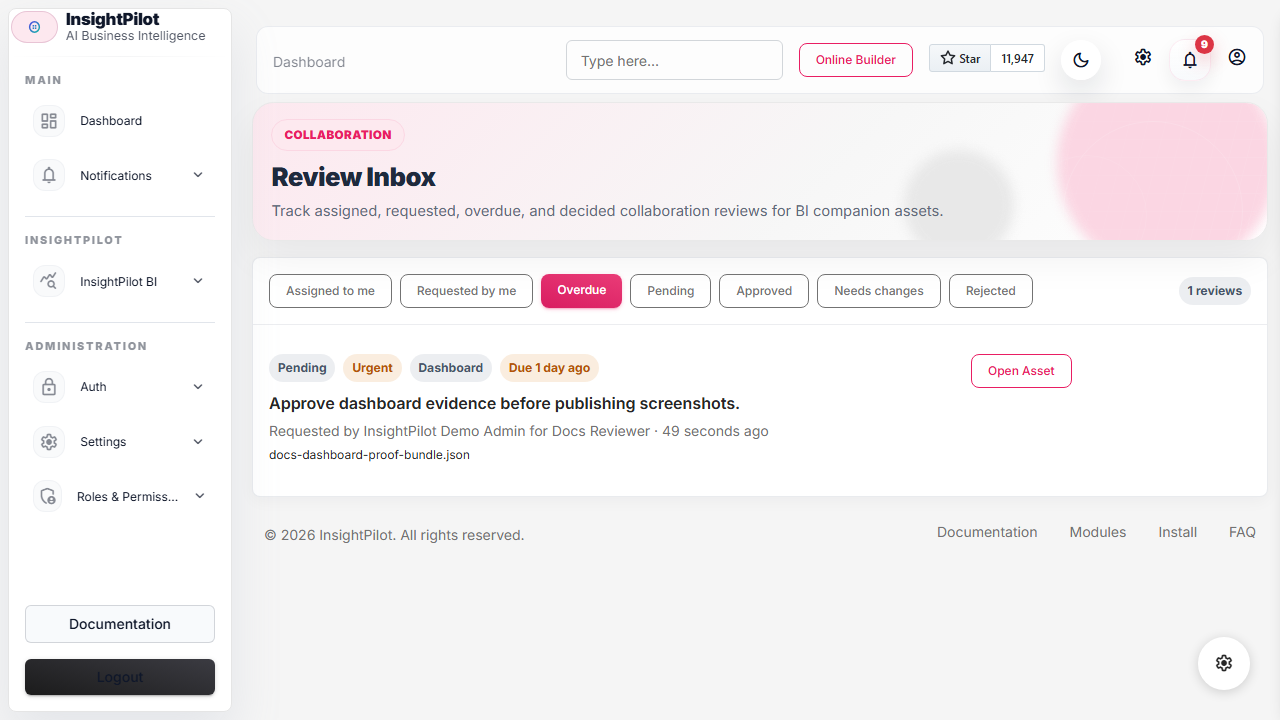
- Request approvals, record decisions like approved, needs changes, or rejected, and transfer ownership inside the active organization.
Recommended Roles
| Role | Recommended Access | Should Avoid |
|---|---|---|
| Owner | Everything, including settings and security. | Sharing admin password. |
| Manager | Dashboards, reports, executive briefs, actions, reviews. | Changing OpenAI or DB credentials. |
| Analyst | Ask Data, saved queries, dashboards, schema labels, analysis workflows. | Full security settings unless trusted. |
| Viewer | Approved dashboards and shared reports. | SQL execution and settings. |
Security Checklist
- Use HTTPS on the live domain.
- Use a strong admin password.
- Enable 2FA for admin users.
- Use read-only credentials for external databases.
- Hide sensitive tables in Schema Explorer.
- Disable AI access for sensitive columns.
- Configure sensitive column masking.
- Review query audit logs and failed query logs.
- Keep the installer locked after setup.
- Back up the app database regularly.
- Do not paste secrets into document content or user questions.
OpenAI And Data Safety
InsightPilot is designed to send controlled context to AI, not the whole database.
- It sends allowed schema details, not full database rows.
- It sends only selected tables and useful columns.
- It can hide sensitive tables and columns.
- It can summarize results using limited aggregates or sample rows.
- It checks documents and questions for prompt-injection style risks.
- It shows confidence, caveats, and sources where applicable.
Exports And Sharing
- Export result tables as Excel-compatible files.
- Export reports and evidence packs as PDF.
- Print report views.
- Create share links with optional password and expiry.
- Include sources, SQL, row samples, timestamps, citations, and audit trail in evidence reports.
Demo Mode For CodeCanyon Preview
Demo mode helps buyers understand the product quickly.
- Run
php artisan insightpilot:demo-installfor a locked local or live-preview demo. - Log in with
admin@ovion.techandDemo@12345. - Keep OpenAI disabled if you do not want public demo token usage.
- Show seeded dashboards, saved queries, reports, anomaly alerts, actions, documents, and presets.
- Use demo fallback screens to explain that live AI requires the buyer's own OpenAI API key.
- Reset demo data with
php artisan insightpilot:demo-resetbefore recording screenshots or videos if needed. - Open Launch Checklist, Marketplace Readiness, and Module Readiness before publishing the preview.
Cron, Explained Simply
Cron is a server timer. It tells Laravel to check whether scheduled jobs need to run.
* * * * * php /path/to/insightpilot/artisan schedule:run >> /dev/null 2>&1Without cron, users can still use manual pages, but automatic monitors, executive briefs, anomaly checks, freshness checks, data quality checks, data contracts, and schema drift checks may not run on time.
Common Problems And Plain Fixes
| Problem | Likely Cause | Plain Fix |
|---|---|---|
| Blank page | PHP error, cache issue, wrong folder, permissions. | Point domain to public, run php artisan optimize:clear, check logs, make storage writable. |
| Installer cannot continue | Missing extension or folder permission. | Enable the missing PHP extension or fix permissions through hosting panel. |
| OpenAI disabled | API key or model missing. | Open Settings -> OpenAI and save both values. |
| Mail does not send | SMTP settings wrong or blocked by host. | Use test email, check SMTP credentials, ask hosting support about blocked ports. |
| Database test fails | Wrong credentials, firewall, remote database access disabled, or missing SQL Server PHP driver. | Check host, port, username, password, grants, remote access, and pdo_sqlsrv for SQL Server. |
| SQL is blocked | SQL guard found unsafe query or non-whitelisted table/column. | Use SELECT-only questions and enable intended tables/columns in Schema Explorer. |
| Reports do not send automatically | Cron missing or mail not configured. | Set cron and test SMTP. |
| Charts look wrong | Question result has unclear date/category/number columns. | Ask a clearer question or adjust chart configuration. |
What To Send Support
If you need support, send clear details. This saves time.
- Website URL.
- Hosting type: shared hosting, VPS, local XAMPP, cPanel, Plesk, etc.
- PHP version.
- Database type and version.
- Exact page where the problem happens.
- Exact error message or screenshot.
- Recent steps you performed before the issue.
- Relevant log lines from
storage/logs, with passwords and API keys removed.
Simple Demo Script For Sellers
- Open dashboard and show KPI widgets.
- Open Data Connections and explain encrypted credentials.
- Open Schema Explorer and show table/column controls.
- Open Ask Data and show a generated SQL preview.
- Show SQL safety status before running the query.
- Show result table, chart, explanation, and action recommendation.
- Save the query and add it to a dashboard.
- Open Documents and show citations plus linked document graph.
- Open Risk Center or Anomalies and show proactive alerts.
- Open Executive Briefs and show PDF/report history.
- Open Evidence Lineage and show reproducibility/audit trail.
- Open Launch Checklist and Module Readiness to show buyer-confidence checks.
Go-Live Checklist
- Installer locked.
- HTTPS enabled.
- Admin password changed from any demo value.
- OpenAI key and model configured.
- Mail test passed.
- Cron configured.
- External database uses read-only credentials.
- Sensitive tables hidden.
- Sensitive columns masked or disabled for AI.
- Roles and permissions reviewed.
- Backup plan confirmed.
- Demo data removed or clearly labeled if not needed.