InsightPilot Modules
This page explains every important module in buyer-friendly language, including who uses it, what it does, and what must be configured first.


Module Map
| Area | Main Pages | Used By | Plain-English Purpose |
|---|---|---|---|
| Foundation | Dashboard, Settings, Roles, Notifications, Activity Logs | Admin, owner | Control who can enter the app, configure services, and review system activity. |
| Data Analytics | Data Connections, Schema Explorer, Ask Data, Saved Queries | Admin, analyst | Connect a business database and ask safe questions in normal language. |
| Dashboards | Dashboards, Dashboard Builder, Executive Briefs, Exports | Owner, manager, analyst | Turn repeated questions into reusable dashboards and scheduled reports. |
| Documents | Documents, Graph, Compliance, Obligations, Risk Center | Compliance team, manager | Explain contracts and linked documents with citations and risk findings. |
| Governance | SQL Guard, Security Audit, Data Quality, Semantic Layer, Evidence Lineage | Admin, analyst, auditor | Make AI answers safer, traceable, and easier to defend. |
| AI Governance | Overview, Reviewer Inbox, Use Cases, Risk Assessments, Risk Rules, Approval Requests, Vendors & Models, Vendor Questionnaires, Evidence Packs, Notices, Controls, Control Library, Evaluations, Incidents, Governance Reports, Monitoring | Compliance, legal, security, privacy, business owner | Govern AI systems before and after use with classification, approvals, evidence, public notices, reports, controls, monitoring, and audit history. |
| Advanced Labs | Insight Lab, Maturity Center, AI Red Team, Integration Presets | Power users, developers | Improve readiness, test safety, seed demos, and extend product value. |
| Marketplace Depth | Launch Checklist, Marketplace Readiness, Module Readiness, Developer & Webhooks | Admin, buyer, developer | Prepare first-run setup, live previews, seed/reset demo scenarios, inspect AI usage, export 9/10 module scores, create API tokens, and deliver signed webhook events with retries. |
| SaaS Operations | Organizations, Billing, Plan Quotas | Owner, admin | Switch organizations, manage team members, enforce tenant scoping, configure Stripe, or grant manual subscriptions for offline buyers. |
Foundation Modules
Admin Dashboard
The dashboard is the first page after login. It gives users a quick view of activity, alerts, reports, and recommended actions.
Settings
Settings stores the app name, branding, OpenAI API key and model, mail settings, Twilio settings, SQL limits, cache time, and other admin configuration. Secrets are encrypted where applicable.
Roles And Permissions
Roles decide what each user can do. For example, viewers can see approved dashboards while admins can connect databases and change security settings.
Notifications And Activity Logs
Notifications show recent app updates, security alerts, collaboration mentions, anomaly notices, and report activity. Activity logs help admins audit who did what.
AI Data Analytics Modules
Data Connections
This is where users connect direct guarded SQL sources (MySQL/MariaDB, PostgreSQL, SQL Server, Redshift, Snowflake, and BigQuery) or managed sources (private CSV, Google Sheets, Stripe, HubSpot, and GA4). Credentials are encrypted. PostgreSQL uses public schema by default and can opt into configured schema lists; SQL Server requires pdo_sqlsrv. Managed sources retain encrypted raw records for traceability but expose only approved typed projections. InsightPilot enforces SELECT-only execution, table allowlists, column allowlists, source freshness, and retry state before analytics runs.
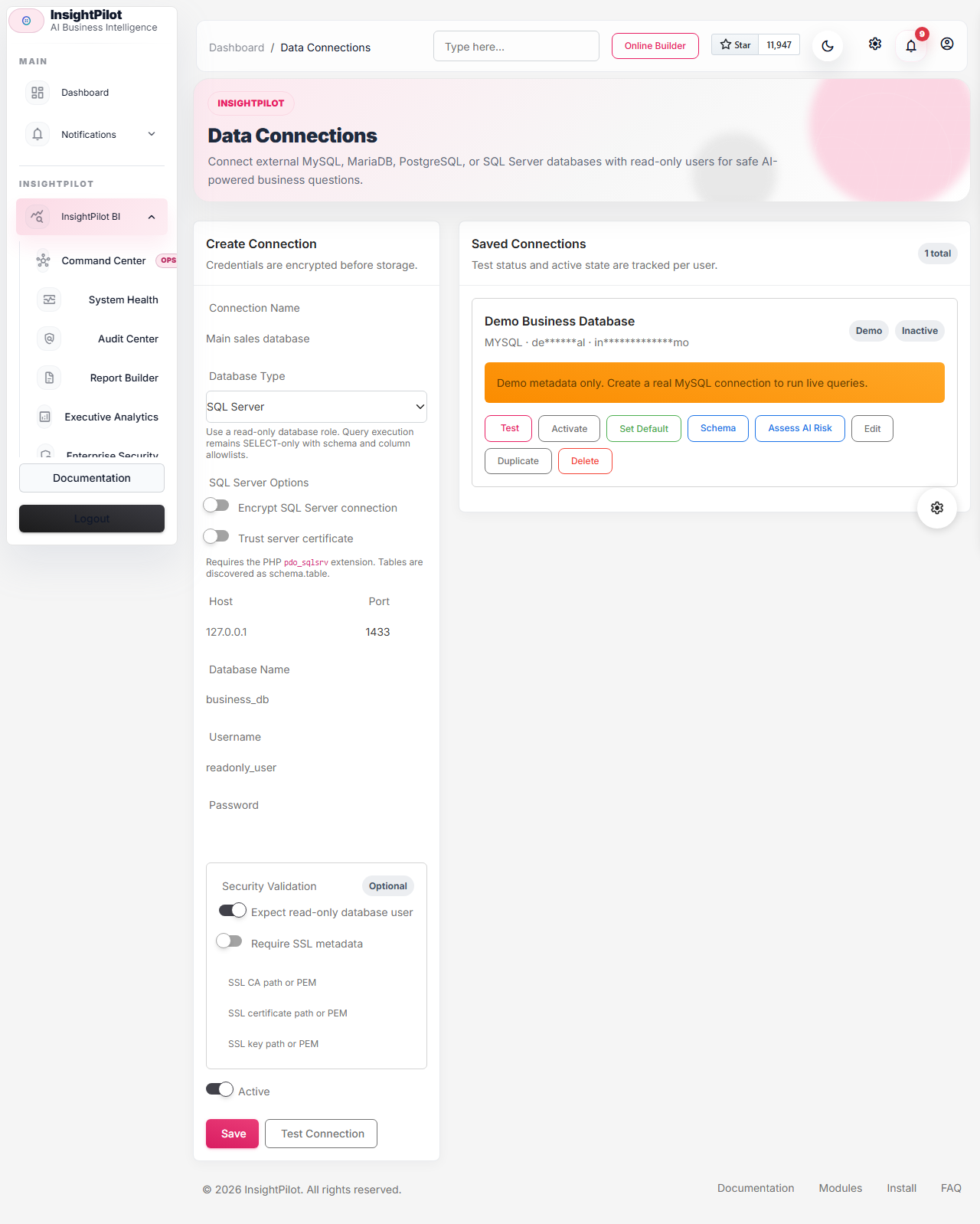
pdo_sqlsrv.Schema Explorer
Schema Explorer reads table and column names from the external database. Users can hide sensitive tables, label tables, describe columns, and decide which tables AI may use.
AI Schema Context Builder
This service builds a clean schema summary for AI. It does not send the full database blindly. It sends approved table names, columns, labels, descriptions, and useful relationship hints.
Ask Data
Ask Data is the main analytics page. Users type questions like "Show revenue by category" and the app generates SQL, previews it, checks safety, runs it, and shows results.
SQL Guard
The SQL Guard blocks dangerous SQL, multiple statements, hidden tables, and non-whitelisted columns. This is one of the most important trust features.
Result Viewer And Charts
Query results are shown as a clean table with sorting, searching, pagination, number formatting, date formatting, chart suggestions, and AI explanation.
Insight-To-Action Modules
Insight Actions
Instead of only saying what happened, InsightPilot recommends what to do next. Actions can be open, assigned, in progress, done, or dismissed.
Saved Queries
Saved Queries let users keep important questions and reuse them later. A saved query can also become a dashboard widget. Saved queries are private by default inside the active organization and can be shared internally with organization, role, or direct-user visibility.
Query Learning Memory
The app tracks repeated questions, table interests, chart preferences, and recurring analysis patterns so it can suggest useful next questions.
Dashboards, Briefs, And Exports
Dashboard Builder
Users create dashboards and add KPI, chart, table, saved query, insight action, risk summary, and anomaly widgets. Widgets can be reordered and resized, bind validated global filters, support drill-through evidence, and open in a responsive presentation view. Dashboards are private by default inside the active organization and can be shared internally when ready.
Executive Briefs
Executive Briefs are scheduled reports that summarize top KPIs, changes, risks, opportunities, and recommended actions. They can be sent daily, weekly, or monthly.
Report Exports And Share Links
Users can export tables, dashboards, reports, and evidence packs. Exports are private by default inside the active organization and can be shared internally; public shared reports can be protected with a password and expiry date.


Command Center
Command Center aggregates actionable work across AI Governance, anomalies, insight actions, obligations, data quality, security findings, failed report exports, webhook failures, and notifications. It stores only per-user operating state such as pin, snooze, dismiss, assignment override, and resolved status.
System Health
System Health runs persisted checks for scheduler freshness, queue depth, oldest jobs, worker heartbeat, failures, mail setup, storage writability, private download routes, source-sync freshness, delivery history, webhook backlog, provider config, permissions, package readiness, and AI Governance monitor freshness. Critical findings can create activity logs and webhook events.
Audit Center
Audit Center searches activity logs, report exports, AI Governance evidence, approval records, webhook deliveries, and security findings. Admins can export PDF audit packs from the current filter set.
Report Builder
Report Builder creates reusable section-based report templates and PDF runs for dashboards, saved queries, document evidence, AI Governance reports, anomaly summaries, and audit packs.
Executive Analytics
Executive Analytics summarizes cross-module trends such as AI risk, approval aging, overdue controls, incidents, webhook failures, data quality, action ROI, and vendor risk.
Enterprise Security
Enterprise Security provides the event foundation for SSO, SCIM-ready provisioning, role mapping, session/device controls, impersonation audit, and stronger IP governance.
For API abilities, endpoint groups, webhook payloads, and connector metadata, see the API Reference.
Document Compliance Modules
Documents
Users upload PDF, DOCX, TXT, or paste contracts, policies, and related documents. The app extracts rules, clauses, obligations, deadlines, exceptions, penalties, and responsible parties. OCR is optional and shows a readiness warning when unavailable.

Document Relationship Graph
The graph shows how documents are linked, for example Contract -> Subdocument -> Policy -> Rule 7 -> Obligation.
Citation-First Answers
Document answers should include source details such as document name, rule number, snippet, linked document, timestamp, confidence, and caveats.
Compliance Simulator
The simulator compares document rules with database evidence. Example: "Does customer X violate rule 7 based on order history?"
Obligation Calendar And SLA Watcher
This module tracks deadlines, required actions, responsible parties, penalties, and overdue obligations.
Risk Center
Risk Center finds missing documents, clause conflicts, high-risk clauses, unresolved obligations, and other compliance risks.
Monitoring And Anomaly Modules
Anomaly Detector
Detects revenue drops, sales spikes, unusual refunds, low stock trends, and customer drops by comparing current and previous periods.
Scheduled Monitoring
Runs recurring checks through Laravel scheduler and cron. It helps the app alert users even when they do not ask a question.
Governance And Audit Modules
Security Audit
Reviews database access, masked columns, failed queries, risky permissions, IP restrictions, and security findings.
Data Quality And Remediation
Checks schema documentation, sensitive masking, and AI-table readiness. Failed checks create remediation plans with severity, due dates, and checklists.
Semantic Layer
Admins can define certified metrics and glossary terms so business users ask consistent questions using trusted definitions.

Evidence Lineage
Stores enough metadata to reproduce and defend answers: question, SQL, source tables, citations, result samples, hashes, timestamps, and caveats.
AI Red Team Scanner
Scans documents and prompts for prompt-injection risks, suspicious instructions, and sensitive information exposure.
AI Governance
AI Governance is a separate AI-use governance workflow. It does not replace the document Risk Center. It lets admins register AI use cases, classify risk, manage editable risk rules, route approval requests, assign reviewers, operate a reviewer inbox, collect evidence, run vendor questionnaires, maintain a reusable control library, publish transparency notices, track incidents, run structured evaluations, complete controls, export governance reports, monitor re-review triggers, and export evidence packs.
Use it when a team wants to adopt an AI tool, connect a third-party model, use AI inside a dashboard/report process, or prove that compliance/legal/security/privacy reviewed an AI system. See the dedicated AI Governance guide.

Advanced And Commercial Polish Modules
Insight Lab
Includes schema drift, data contracts, natural language dashboard builder, AI analyst workflows, playbooks, impact tracking, and demo scenarios.
Maturity Center
Includes dashboard templates, chart presentation packs, learning digests, collaboration decisions, setup readiness checks, and mention inbox.
Integration Presets
Pattern-based presets for POS, CRM, HR, TicketPro, ecommerce, booking, SaaS, and other business ecosystems. Presets include table patterns, sample questions, labels, dashboards, anomaly rules, and brief templates.
Demo Templates
Demo data makes the product look useful immediately in CodeCanyon live preview, screenshots, and buyer evaluation.
Marketplace Readiness
The Marketplace Readiness page at /insight-pilot/marketplace-readiness is the buyer gateway. It brings the seven-step best demo path, setup health, OpenAI status, AI usage, demo pack readiness, guided scenario runs, standout dashboard readiness, and documentation links into one checklist.
Launch Checklist
The Launch Checklist page at /insight-pilot/launch-checklist tracks installer lock, OpenAI setup, read-only database connection, demo data, dashboard creation, mail, billing, module readiness, scorecard export, and webhook test status.
Developer & Webhooks
The Developer & Webhooks page at /insight-pilot/developer lets admins create Sanctum API tokens, configure signed webhooks, send test events, and review delivery logs without using an external API client.

Recommended Workflow
- Install the app and lock the installer.
- Configure OpenAI and mail.
- Create a read-only external database connection.
- Discover schema and whitelist safe tables.
- Add table and column business labels.
- Ask a question and preview SQL.
- Run only if safety status is safe.
- Save the query and add it to a dashboard.
- Upload documents and link related rules if compliance is needed.
- Schedule executive briefs and anomaly monitors.
- Review evidence lineage, security audit, and data quality checks regularly.
- Register AI systems in AI Governance, classify risk, collect evidence, and route approval before production use.
- Run the Launch Checklist and Module Readiness export before publishing a live preview.