Configuration
Configure the app from the admin Settings panel after installation.

AI Provider Settings
Open Settings -> AI Provider. Enter the provider, base URL, API key, model ID, request timeout, SQL row limit, SQL timeout, result cache TTL, user-key policy, and usage logging preference.
AI Governance approval summaries use the same provider settings. If OpenAI or an OpenAI-compatible provider is not configured, the approval summary falls back to a deterministic summary based on use-case fields, questionnaire answers, risk factors, classification, and reviewer tracks.
| Field | What It Means | Plain Tip |
|---|---|---|
| Provider | OpenAI or an OpenAI-compatible Responses API endpoint. | OpenAI remains the default buyer-friendly choice. |
| Base URL | The provider API root. InsightPilot posts to /responses under this URL. | Default: https://api.openai.com/v1. |
| API key | The private key used to call the configured AI provider. | Keep it secret. Replace it if exposed. |
| Model | The model ID used for AI generation. | Enter the exact model you want to use. The app intentionally has no default. |
| Timeout | How many seconds the app waits for AI. | Use a higher value if responses are timing out. |
| SQL row limit | Maximum rows returned from external database queries. | Keep this reasonable to avoid heavy reports. |
| Result cache TTL | How long temporary query results can be reused. | Short cache is safer for sensitive data. |
Mail Settings
Configure SMTP host, port, username, password, encryption, from address, and reply-to address. Use the test email button before enabling scheduled reports.
- Use the mail test button after saving SMTP settings.
- Executive briefs and report emails depend on mail working.
- AI Governance sends in-app notifications and attempts email notifications for assigned reviews, requested changes, due/overdue conditions, expiring approvals, re-review alerts, serious incidents, and final decisions.
- If sending fails, ask hosting support whether SMTP ports are blocked.
- Use a real "from" address that belongs to your domain.
External Database Connections
- Open Data Connections.
- Create a direct guarded SQL connection or a managed-source connection using least-privilege credentials.
- Test the connection.
- Refresh schema discovery.
- Hide sensitive tables and disable sensitive columns.
- Add labels and descriptions so AI context is business-friendly.
pdo_sqlsrv. Source credentials are encrypted, raw managed records stay encrypted, and every query or virtual-dataset projection is allowlisted before execution.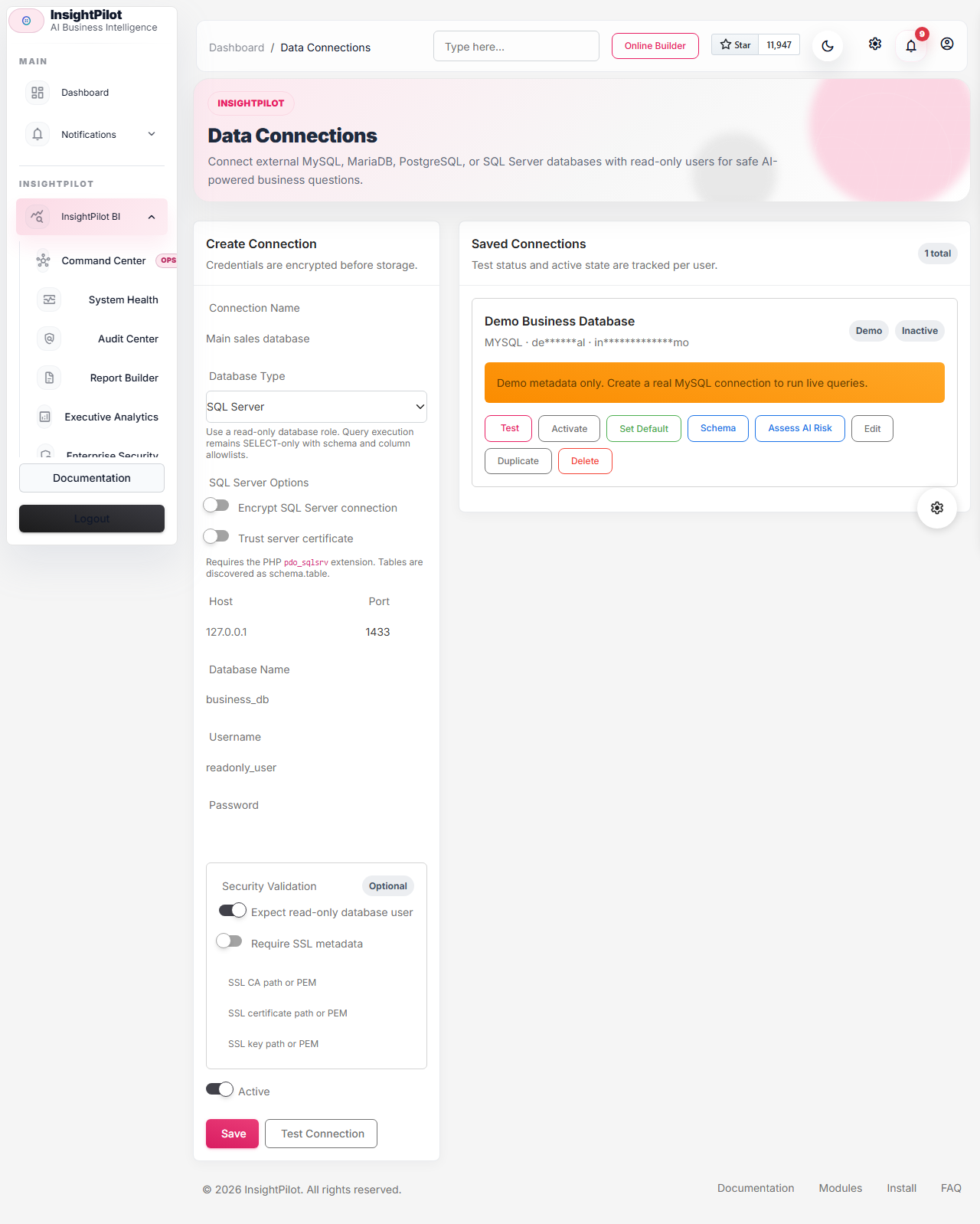
Roles and Permissions
Owners and admins should keep settings, security audit, schema management, and SQL execution permissions limited. Analysts can ask data and view dashboards shared with them inside the active organization. Viewers should only view approved dashboards, saved queries, and reports.
| Role | Recommended Permissions |
|---|---|
| Owner | Full access, including settings, security audit, database connections, and billing-related OpenAI settings. |
| Manager | Dashboards, reports, executive briefs, actions, anomalies, and review workflows. |
| Analyst | Ask Data, saved queries, dashboards, schema labels, and analytics workflows. |
| Viewer | Approved dashboards and reports only. |
SaaS, Organizations, And Billing
Set SAAS_MODE=true only when you want subscription gates. Users can switch organizations from Organizations, and API clients can send X-InsightPilot-Organization only for organizations where the token owner is a member.
SAAS_MODE=true
STRIPE_KEY=pk_live_or_test
STRIPE_SECRET=sk_live_or_test
STRIPE_WEBHOOK_SECRET=whsec_...
STRIPE_WEBHOOK_TOLERANCE=300
Stripe checkout works when a plan has a Stripe price ID. If Stripe is not configured, admins can still grant manual subscriptions from Billing. Expired or failed subscriptions become read-only except for billing, organization, settings, and logout routes.
Billing also includes customer portal access when Stripe is configured, manual fallback copy for offline buyers, cancel/reactivate controls, subscription state banners, storage usage, and the latest Stripe event ID so admins can verify webhook idempotency.
Document Uploads And OCR
Documents accept pasted text plus PDF, DOCX, or TXT uploads. OCR is optional. When OCR is disabled or unavailable, the app saves the document and displays a readiness warning instead of breaking the host.
AI Governance evidence uploads also use Laravel public storage. Run php artisan storage:link after installation so uploaded evidence files can be downloaded through authorized routes.
AI Governance evidence packs and governance reports are written to storage/app/public/insightpilot/exports. Keep this path writable and include it in backup/retention planning if exported evidence must be preserved.
INSIGHTPILOT_DOCUMENT_UPLOAD_MAX_KB=10240
INSIGHTPILOT_OCR_ENABLED=false
INSIGHTPILOT_OCR_BINARY=tesseract
Webhook Delivery
Webhook payloads include organization_id, event, created_at, delivery_id, attempt, and data. Signatures use sha256= HMAC over the JSON payload. AI Governance emits classification, approval, incident, control, evidence-pack, vendor-questionnaire, change-log, re-review, report, and public-notice events.

php artisan insightpilot:deliver-webhooksRelease, Demo, And Cleanup Commands
v2.0 adds command-line shortcuts for installed demos, source synchronization, queue monitoring, benchmark evidence, backup records, restore drills, release packaging, and retention cleanup.
php artisan insightpilot:demo-install
php artisan insightpilot:demo-reset
php artisan insightpilot:seed-ai-governance-demo
php artisan insightpilot:cleanup
php artisan insightpilot:sync-sources
php artisan insightpilot:queue-heartbeat
php artisan insightpilot:benchmark
php artisan insightpilot:backup
php artisan insightpilot:restore-drill --target=staging
php artisan insightpilot:package-codecanyon --dry-run
composer release:check
composer release:package
npm run e2e
npm run screenshots
npm run docs:screenshots
Use a database queue worker in production. Redis is supported as an optional enhanced backend; sync is for local development and tests only. Dashboard subscriptions deliver permission-checked secure links and optional proof bundles instead of unrestricted data attachments.
On Windows hosts where php is not on PATH, set INSIGHTPILOT_PHP_BINARY before running Playwright commands, or use the default XAMPP locations detected by the screenshot runner.
Composer must be installed for composer release:check and composer release:package. If Playwright reports a missing browser binary, run npx playwright install chromium before npm run screenshots.
If Playwright reports that http://127.0.0.1:8094 is already used, set INSIGHTPILOT_E2E_PORT and INSIGHTPILOT_E2E_BASE_URL to a free local port before rerunning screenshots.
Schedule cleanup alongside webhook delivery if you want old query caches, expired exports, webhook logs, AI usage logs, and demo run records removed automatically.
INSIGHTPILOT_QUERY_CACHE_RETENTION_DAYS=14
INSIGHTPILOT_REPORT_EXPORT_RETENTION_DAYS=30
INSIGHTPILOT_WEBHOOK_DELIVERY_RETENTION_DAYS=30
INSIGHTPILOT_AI_USAGE_RETENTION_DAYS=90
INSIGHTPILOT_DEMO_RUN_RETENTION_DAYS=30
INSIGHTPILOT_CLEANUP_AUDIT_PACK_DAYS=365
INSIGHTPILOT_CLEANUP_SECURITY_EVENT_DAYS=365
Scheduler
Use Laravel scheduler for monitors, anomalies, executive briefs, AI Governance monitoring, freshness checks, data quality checks, data contracts, and schema drift detection.
* * * * * php /path/to/insightpilot/artisan schedule:run >> /dev/null 2>&1AI Governance and System Health checks can also be run manually:
php artisan insightpilot:run-ai-governance
php artisan insightpilot:run-ai-governance --user_id=1
php artisan insightpilot:run-health-checks
php artisan insightpilot:run-health-checks --user_id=1
php artisan insightpilot:seed-ai-governance-demo --user_id=1
If scheduled reports, anomaly checks, AI Governance alerts, data freshness checks, or monitoring do not run automatically, the first thing to verify is cron.