AI Copilot
AI Copilot adds provider-backed ticket assistance without changing the ticket workflow. Suggestions are drafts only: the app never sends a customer reply automatically.
Provider Setup
| Setting | Meaning |
|---|---|
| Enable AI Copilot | Shows AI actions on ticket intelligence screens when the provider is ready. |
| Provider | The adapter to use. The current adapter supports OpenAI-compatible chat completion APIs. |
| Base URL | The provider API root, for example https://api.openai.com/v1. |
| Model | The model name sent to the provider. |
| API Key | The credential used for provider requests. |
| Timeout Seconds | HTTP timeout for provider responses. |
Ticket Actions
- Ticket Summary: concise current state, impact, and next action.
- Suggested Reply Draft: editable customer-safe reply text.
- Category, Priority & Tags: classification recommendations with reasons.
- Duplicate / Similar Ticket Hints: signals the agent should verify.
- Sentiment & Risk: requester tone, customer risk, and escalation posture.
- SLA Escalation Note: internal escalation draft for risky cases.
Workflow Actions
| Action | Purpose | Safety behavior |
|---|---|---|
triage | Predict category, priority, tags, sentiment, duplicate risk, SLA risk, and suggested assignee. | Suggestions are auditable and do not overwrite critical fields unless an admin explicitly enables low-risk auto-apply. |
reply_compose / reply_rewrite | Draft, improve tone, shorten, expand, translate, or make a reply more professional. | Generated text stays editable in the reply composer before sending. |
reply_qa | Warn about unsupported claims, private details, weak tone, missing timeline, or mismatch with ticket facts. | Warnings do not block by default. Strict blocking is controlled by admin setting. |
resolution_summary | Draft internal resolution summary, customer closure note, root cause, and prevention steps. | Only accepted summaries are saved to closure fields. |
knowledge_draft | Create draft FAQ or knowledge article from resolved tickets. | AI drafts require human review before publishing. |
AI Trust Report
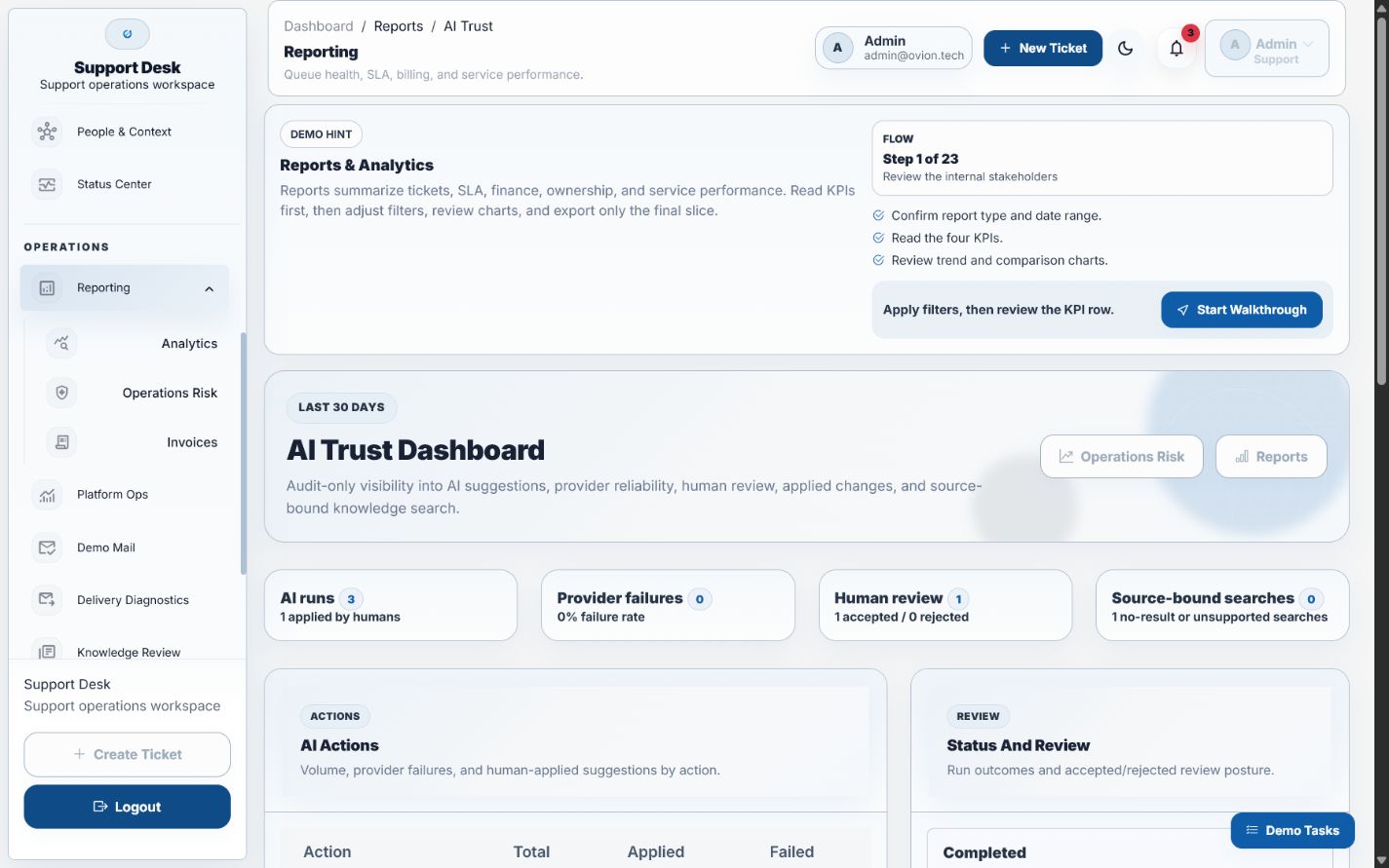
/reports/ai-trust summarizes AI suggestion runs by action, status, applied rate, accepted/rejected review status, provider failures, model, and provider. It also includes source-bound knowledge-search signals from knowledge_search_events. This report is audit-only; it does not perform new AI generation.
Source-Bound Knowledge Search
AI knowledge search is restricted to approved knowledge-base articles and resolved-ticket summaries. Every answer must include citations, and customer-facing answers are blocked when no approved source supports the response.
Audit and Safety
- Every request writes an
ai_suggestion_runsrecord with ticket, user, action, provider, model, status, prompt payload, response payload, suggestion text, metadata, review status, confidence, and error message when available. - Completed suggestions can be marked as applied, but applying only updates the audit record. It does not post a ticket reply.
- If AI is disabled or credentials are missing, the run is skipped and the ticket shows a clear setup message.
- Provider failures are recorded as failed runs so admins can troubleshoot credentials, endpoint, timeout, or model names.
Verify AI Activity
Open the AI Trust dashboard after a draft or classification run. Confirm the provider, model, run status, reviewer state, and linked ticket before using the output in a customer reply. Failed or skipped runs should remain visible for administrators.