Bookings And Calendar
Bookings are the main business record. Calendar is the visual operating view of those records. Together they control scheduling, no-show state, staff day-of-work actions, payment handoff, and external calendar sync.
What A Booking Connects
A booking is not only a row in a table. It is the link between the customer promise and the vendor operation.
Availability Chain
BookFlow only shows slots that pass the availability checks. If any required part is blocked, the slot should not be offered.
| Check | Plain meaning |
|---|---|
| Service duration | A 75 minute service needs a bigger open window than a 30 minute service. |
| Buffer | Extra cleanup or preparation time blocks nearby slots. |
| Staff working hours | The therapist must be working at that location on that date. |
| Resources | A room or equipment cannot be used by two bookings at the same time. |
| Existing bookings | BookFlow prevents collisions with confirmed operational bookings. |
Bookings Admin

From this page, a vendor can inspect booking details, collect payments, reschedule, change status, mark no-show, and request edits for completed bookings. Completed bookings require special handling because changing history affects reports and receipts.
Calendar
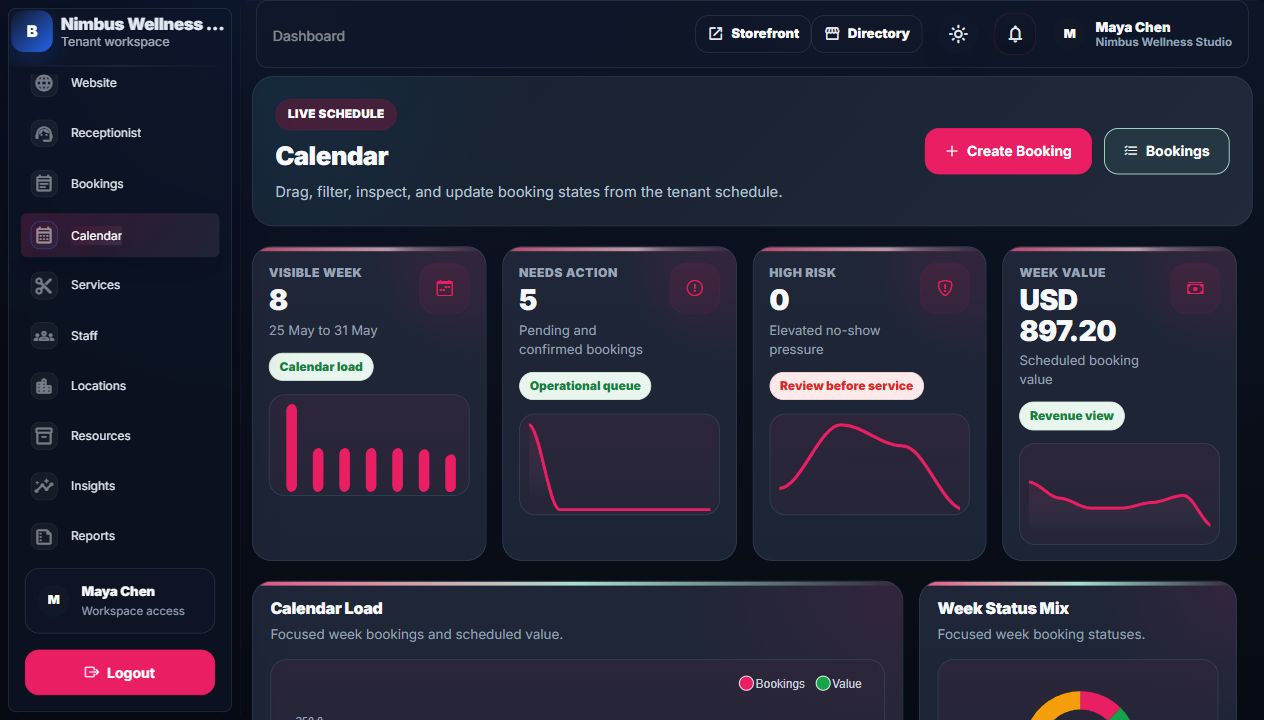
Calendar actions must preserve the same rules as booking actions. Moving a booking should still respect staff, service, location, resource, and conflict rules.
Calendar Sync
Calendar sync is the bridge between BookFlow's booking record and external calendar tools. When buyer credentials are configured, booking-created, rescheduled, cancelled, and completed events can be sent outward. When credentials are not configured, simulator records and activity logs prove the adapter contract without claiming live sync.
| Event | BookFlow source | External proof |
|---|---|---|
| Created | New booking from storefront, admin, CRM lead, or customer portal. | Calendar event payload with customer, service, location, staff, and time. |
| Rescheduled | Admin/calendar/customer reschedule after availability checks. | External event time updates and local booking history remains intact. |
| Cancelled or no-show | Status action from admin or staff mobile. | Status marker or cancellation action in the sync activity proof. |
| Completed | Booking status after service delivery. | Reports and retention queues update from the same local state. |
Staff Mobile Flow
The staff mobile page is a slim daily schedule. It focuses on actions staff need during the appointment day: check in, mark no-show, open payment handoff, read customer notes, and jump to receptionist/support context without loading the full admin console.
Example: Why A Slot Does Not Show
Massage room conflict
Deep Tissue Massage needs a therapist and Therapy Room 1. If Avery is free at 10:00 but Therapy Room 1 is already booked, BookFlow should not show that slot for Avery. The customer only sees slots that the business can actually deliver.
Booking Statuses
| Status | Meaning | Connected behavior |
|---|---|---|
| Pending | Booking exists but needs confirmation or follow-up. | Can trigger reminders or payment prompts. |
| Confirmed | Booking is expected to happen. | Shows clearly on calendar and customer portal. |
| Completed | Service was delivered. | Can trigger review, receipt, retention, and report updates. |
| Cancelled | Booking will not happen. | May affect revenue, no-show tracking, and customer profile. |
| No-show | Customer did not attend the scheduled booking. | Feeds no-show report, risk markers, deposit policy review, and follow-up queues. |
Detailed Screen Reference
For every booking filter, booking table column, selected booking detail field, calendar filter, inspector field, and status action, open Vendor Admin Indexes Reference.