Docs / Vendor Admin Index Reference Vendor Admin Index Reference
These are the main Nimbus admin list and workspace pages. They use shared KPI cards, chart cards, tabs, table patterns, icon actions, SweetAlert confirmations, loaders, and toast feedback.
Screen Map
Screen Local link Primary purpose Screenshot
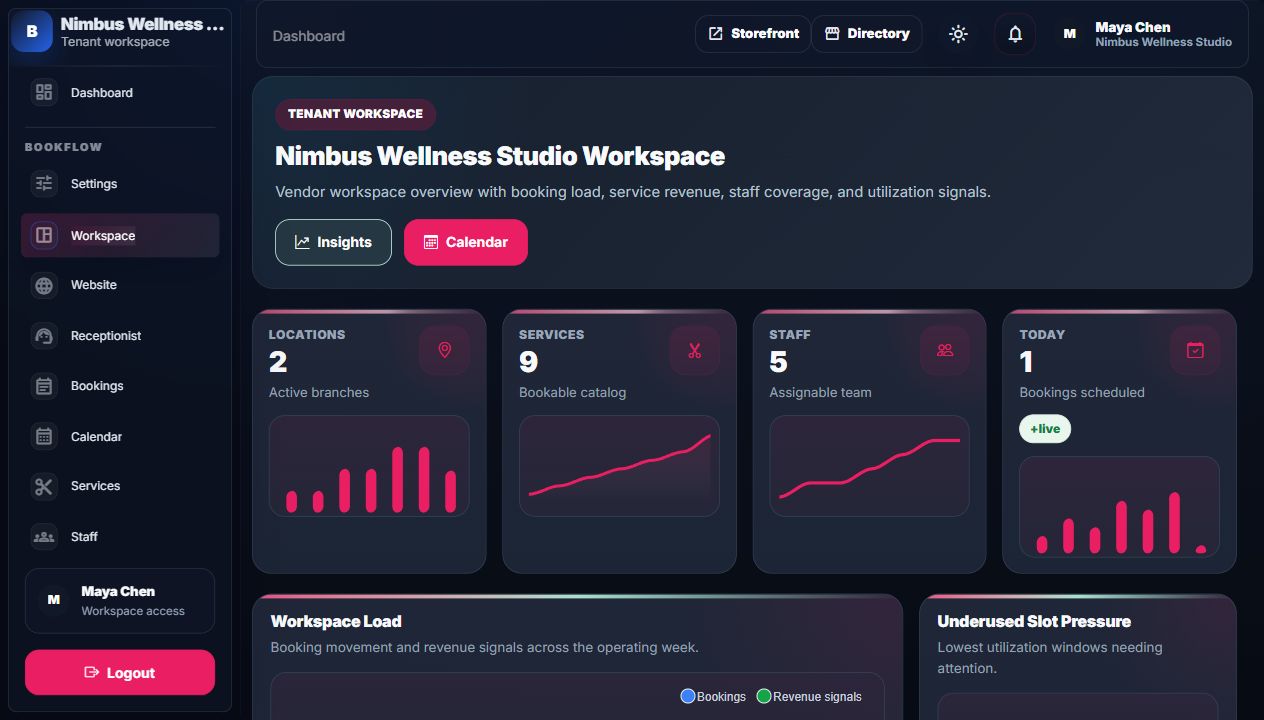
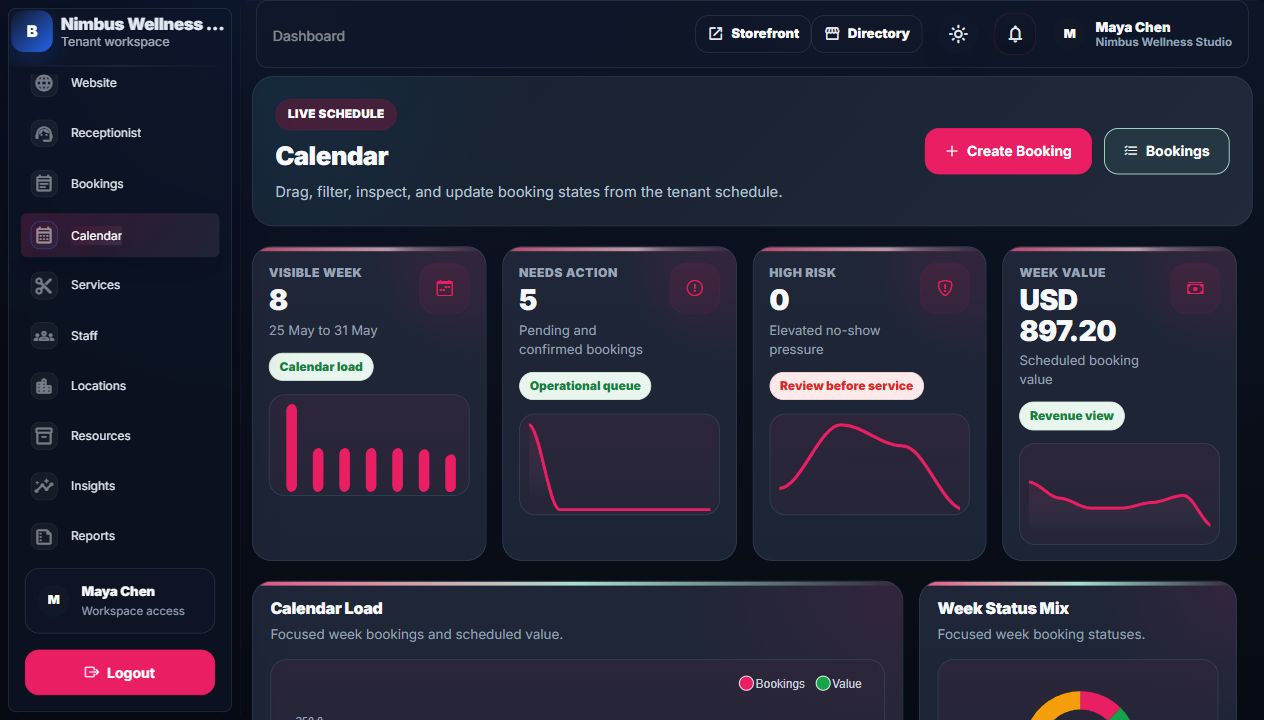
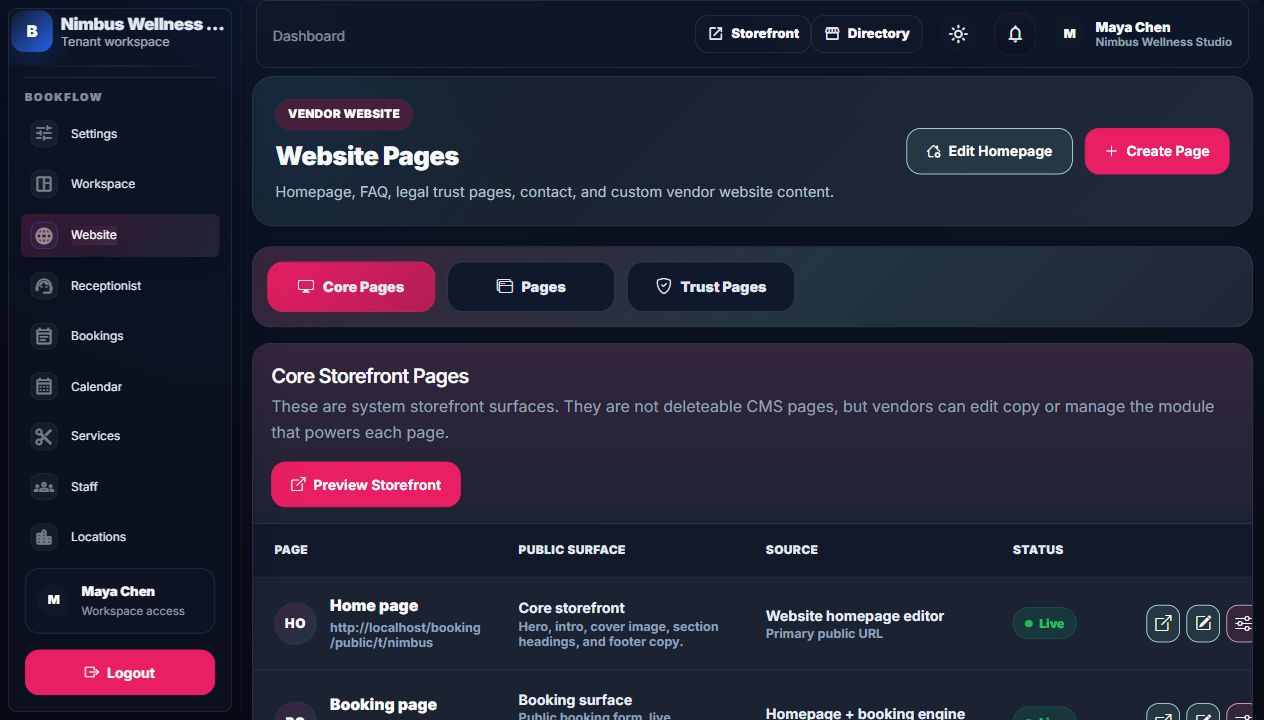
Dashboard Admin Workspace overview across setup, booking load, revenue, and utilization. admin/dashboard.png Bookings Bookings Search, filter, inspect, update status, collect payment, request completed-booking edit approval. admin/bookings.png Calendar Calendar Visual schedule, filters, inspector, drag/move/status actions. admin/calendar.png Services Services Catalog list, pricing/duration charts, category breakdown, edit/delete actions. admin/services.png Staff Staff Bookable professional list, coverage, working windows, public profile signals. admin/staff.png Locations Locations Branches, contact data, addresses, timezones, status. Uses shared admin table layout. Resources Resources Rooms/devices/capacity list and service coverage. Uses shared admin table layout. Website Website Homepage, core pages, required trust pages, and custom CMS pages. admin/website.png
Dashboard
The dashboard is the first vendor workspace screen after login. Dashboard KPIs And Charts
Widget What it counts Source data How to read it Why it matters
Locations KPI Active branches. Tenant locations. Shows whether the workspace has branch coverage. Locations anchor timezone, staff coverage, and booking availability. Services KPI Bookable catalog count. Active services. Low number means storefront has little to sell. Services drive customer choices and revenue. Staff KPI Assignable staff profiles. Staff profiles. Shows whether services have enough professionals. Staff coverage controls available slots. Today KPI Bookings scheduled today. Bookings by scheduled date. Daily load indicator. Helps owner know today's operation pressure. Workspace Load chart Booking movement and revenue signals across the week. Recent booking counts and service revenue signals. Columns show bookings; line shows revenue signal. Connects schedule load to money. Underused Slot Pressure chart Low-utilization windows. Slot analytics. Low values show weak schedule demand. Use it for promotions, campaigns, or staff schedule cleanup. Service Revenue chart Revenue by service. Service analytics. Higher bars are stronger earners. Guides pricing and service focus.
Dashboard Tables And Lists
Table/list Column/item Meaning Action
Recent Bookings Booking Customer plus service. Open booking detail. Recent Bookings Schedule Appointment date/time and location. Review upcoming work. Recent Bookings Status Pending, confirmed, completed, or cancelled. Know current state before opening. Recent Bookings Actions Eye icon opens booking detail. Inspect customer/payment/notes. Service signals Service, date, bookings, revenue. Daily service analytics. Spot high/low performers. Low-use slots Date/time, location/service, utilization. Weak windows. Use for retention campaign or schedule changes.
Bookings Index
Bookings is the vendor's main operational list for appointment records. Booking KPIs And Charts
Widget What it counts Source data How to read it Why it matters
Booking KPI cards Current booking totals, payment totals, or recent movement depending on controller data. Booking and invoice summaries. Read the number first, then subtitle for context. Owner sees workload and money pressure quickly. Booking Load And Revenue Last seven days by scheduled date. Bookings and scheduled value. Shows volume and revenue movement together. Useful for staffing and cash planning. Status Mix Current booking status distribution. Booking statuses. Large pending/cancelled slices need attention. Status quality affects operations and reports. Status/payment pills Counts by booking status and payment state. Current filtered booking collection. Read as quick filter context. Shows whether action queue is mostly unpaid or unconfirmed.
Booking Filters
Filter Required? Meaning What it filters Common mistake
Search No Booking code, customer, email, or service. Text-matching booking rows. Searching phone when not included in search implementation. Status No Pending, confirmed, completed, cancelled. Booking status. Not resetting after a filtered view. Payment status No Unpaid, paid, refunded, void. Payment state. Confusing booking status with payment status. Location No Branch filter. Booking location. Expecting deleted/inactive locations to appear. Service No Service filter. Booking service. Filtering by inactive services may hide old rows depending on list data. Reset No Clear filters. Returns to full booking index. Not using reset before assuming data is missing.
Booking Table Columns
Column Meaning Source/relationship User action
Booking Booking code and service name. Booking plus service relationship. Identify the appointment. Schedule Date/time, staff, and location. scheduled_for, timezone, staff profile, location. Check who/where/when. Customer Name and email. Booking customer fields/user. Contact or identify customer. Payment Final price and payment status badge. Booking amount and payment_status. See if money is due. Status Status selector or locked completed message. Booking status plus edit access rules. Change status when allowed. Actions Eye icon. Route with selected booking id. Open booking detail tab.
Selected Booking Detail
Area/field Meaning What changes Approval rule
Invoice total Total invoice value. Read-only here. No approval needed to view. Balance due Remaining money owed. Collect Payment can reduce it. Completed bookings need payment edit approval unless user is allowed. Deposit target Deposit amount suggested by booking confidence snapshot. Read-only here. No approval needed to view. Completed booking lock Explains why completed bookings cannot be changed freely. Request approval creates an edit request. Admin can approve/reject. Request access for Status, reschedule, payment, or details. Creates requested edit type. Only shown when user lacks completed booking edit access. Reason Why change is needed. Saved on edit request. Admin sees it before approving/rejecting. Payment kind Deposit or balance. Payment receipt payload. Locked for completed bookings without approval. Provider Manual or demo card. Payment method/provider. Locked for completed bookings without approval. Amount Amount to collect. Creates payment/receipt and updates balance. Locked for completed bookings without approval.
Calendar
Calendar shows bookings in a visual schedule plus an inspector panel.
Widget/field Meaning Source Action Connection
Calendar KPIs Focused schedule totals. Calendar controller summaries. Read daily/weekly pressure. Same bookings as index, shown by date window. Calendar Load chart Focused week bookings and value. Calendar event feed and financial values. Read volume by day. Links operations to revenue. Week Status Mix Status mix in focused week. Bookings in selected date window. Watch pending/cancelled share. Helps clean up schedule quality. Location filter Branch scope. Locations. Show only one branch. Event feed reloads. Service filter Service scope. Services. Show one service's appointments. Event feed reloads. Staff filter Staff scope. Staff profiles. Show one person's calendar. Event feed reloads. Status filter Status scope. Booking status. Show only pending/confirmed/completed/cancelled. Event feed reloads. Focus Date Calendar date anchor. User input. Move calendar window. Charts and calendar summary focus around it. Booking Inspector Selected event detail. Calendar event payload. Inspect service, contact, risk, payment, workflow, resources. Can open booking or change quick status. Quick Status Confirm, complete, cancel buttons. Status action routes. Change booking status. Uses Swal yes/no, loader, and toast result.
Services, Staff, Locations, Resources
Services index with pricing/duration analytics. Staff index with coverage and rating analytics.
Catalog And Coverage Charts
Page Chart/KPI What it counts How to read it Why it matters
Services Service KPI cards Catalog totals and service signals. Each card has value, subtitle, and mini chart. Shows if catalog is healthy enough for bookings. Services Pricing And Duration Top services by price with duration overlay. Compare expensive/long services. Helps pricing and schedule capacity decisions. Services Category Mix Service count by category. Shows catalog balance. Highlights over/underrepresented service groups. Staff Coverage Service assignments and weekly working windows per staff. Higher bars mean broader coverage. Staff coverage controls available slots. Staff Ratings Public rating signals. Read as customer trust strength. Improves storefront/team conversion. Locations Timezone Coverage Branches by timezone. Shows schedule distribution. Important for multi-location scheduling. Locations City Coverage Branches by city. Shows market footprint. Directory filtering depends on city data. Resources Resource Types Room/device/equipment categories. Shows capacity mix. Protects bookings from resource conflicts. Resources Service Coverage Eligible service links by resource. Bars show how many services can use each resource. Missing links can block availability.
Index Table Columns
Website Pages Index
Website Pages is where vendors manage their public CMS pages and homepage editor entry.
Tab/table Column/item Meaning Action Connection
Core Pages Page System page name and public URL. View/edit/manage. Home, booking, services, plans, team are route-backed, not deleteable CMS pages. Core Pages Public Surface What customers see there. Understand page purpose. Some pages are powered by services, programs, or staff data. Core Pages Source Module that controls page data. Open source module. Example: services page reads Services module. Pages Page CMS page title and public URL. View/edit. FAQ, terms, privacy, contact, custom pages. Pages Type Kind and required/custom label. Know if deletion is allowed. Required trust pages cannot be deleted. Pages Placement Header/footer visibility and sort order. Control navigation. Storefront header/footer read these flags. Pages Status Published or draft. Control public availability. Unpublished pages return unavailable/not found publicly. Pages Updated Last update and published date. Audit content freshness. Useful for legal/trust page reviews. Trust Pages Required trust page list. FAQ, terms, privacy, contact starter pages. Edit content. Footer and booking agreement links rely on these pages.
Common Index Actions
Action Icon style Confirmation/loading Result Common mistake
Create/New Plus icon with text. Usually navigates to create page, no destructive confirmation. Opens dedicated create form. Expecting create fields on index page. Edit Pencil icon. Navigates to edit page. Existing record can be changed. Editing active services affects future booking options. Delete Trash icon. SweetAlert yes/no, then loader, then toast. Removes from future flows; historical bookings stay. Trying to delete required website pages. View/open Eye or external-link icon. Usually no confirmation. Opens public page or detail panel. Forgetting draft CMS pages cannot be viewed publicly. Status change Select plus save or quick status button. SweetAlert yes/no, loader, toast. Booking status changes if allowed. Completed bookings require approval for restricted users.