Programs And Retention
Programs are the customer growth layer. They help the business sell memberships, packages, vouchers, campaigns, wallet adjustments, package credits, review queues, and rebooking journeys instead of relying only on one-time appointments.
Program Types
| Type | Plain meaning | Customer portal effect |
|---|---|---|
| Membership | A recurring or time-based customer benefit, such as monthly discounts or deposit waivers. | Appears in wallet and can influence booking price/benefit hints. |
| Package | Prepaid credits for services, such as six recovery sessions. | Shows remaining credits and eligible services. |
| Voucher | A targeted benefit that can apply to a customer or service. | Shows as a benefit that can be used before expiry. |
| Campaign | A retention prompt, offer, or follow-up touchpoint. | Can produce next best actions and email-ready touchpoints. |
Customer Growth Retention Loop
This loop is why the customer portal starts with action cards instead of a plain dashboard. Customers should immediately know what to do next.

Vendor Program Admin
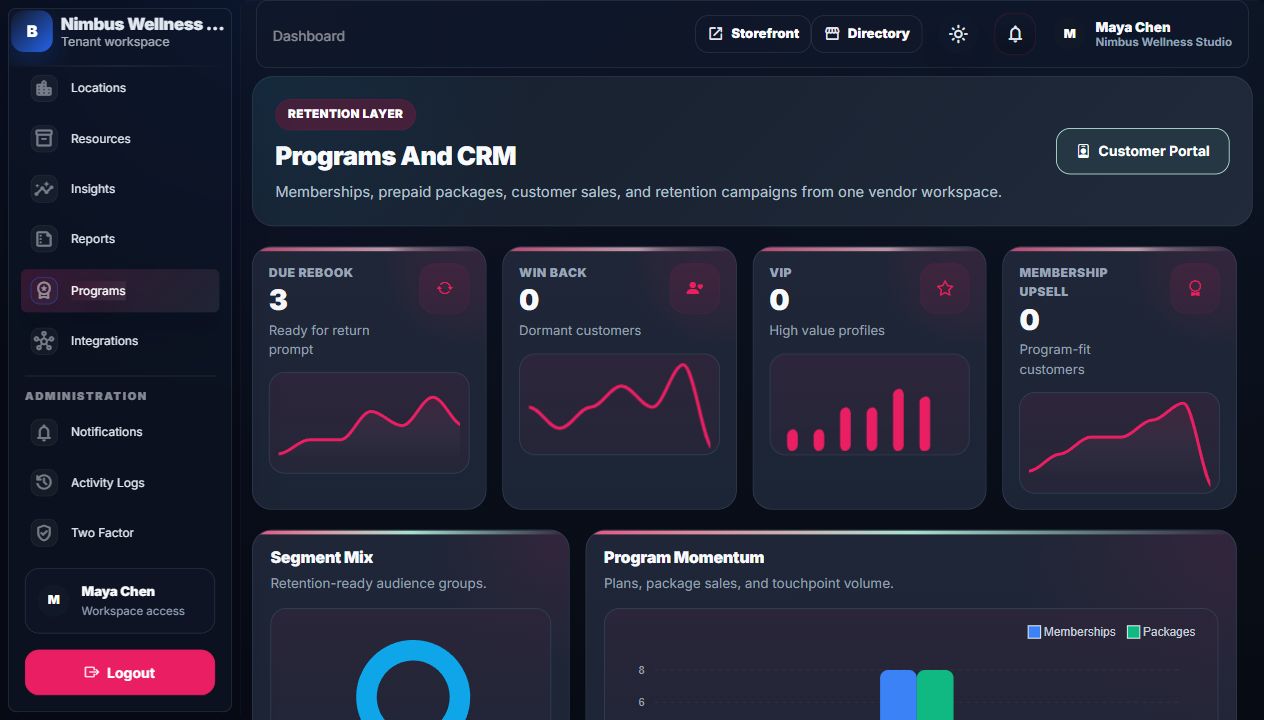
Current Programs screen structure
The admin Programs page is organized as tabs so operators do not have to scan one long page. Use Overview for health and lifecycle proof, Plans & Perks for plan/package setup and perk CRUD, Assign & Sell for customer dropdown assignment, Members for eligibility, Usage for the benefit ledger, Renewals for expiry, and Campaigns/Activity for retention work.
Wallet Adjustments And Package Credits
Programs also gives operators a controlled way to prove customer value after sale. Package sales add service credits to the wallet. Admin wallet adjustments add or remove cash balance with an auditable reason. Both show in the customer wallet, Programs ledger, notifications, and demo mailbox proof.
| Action | What changes | Proof |
|---|---|---|
| Sell package | Adds package purchase and remaining service credits. | Customer wallet package card, usage ledger, payment page benefit summary. |
| Assign membership | Activates membership rules for a customer account/email. | Wallet membership card, booking benefit snapshot, renewal queue. |
| Wallet adjustment | Adds or removes cash balance with source and note. | Programs wallet ledger, customer wallet ledger, notification, demo mailbox. |
| Review queue | Completed bookings without reviews become follow-up work. | Customer portal review action, marketplace review proof, retention reports. |
| Scheduled report | Creates a recurring delivery plan for owners/admins. | Reports schedules page, run history, scheduled report command output. |
Membership Perk CRUD
Membership perks are customer-visible benefit rules. A vendor can choose a reusable perk from the dropdown, enter a custom perk, edit the perk label or description, disable it, or delete it from the same Programs page. Active perks appear in the member wallet, booking benefit summaries, payment ledgers, and vendor membership views.
| Action | Where | What changes | How to prove it |
|---|---|---|---|
| Create perk | Plans & Perks tab, Membership Perk CRUD card. | Adds a perk rule under the selected membership plan. | The perk chip appears on the plan and in customer-facing benefit summaries. |
| Edit perk | Same card, inline row. | Updates label, description, priority, and active state. | Refresh the Programs page or wallet preview and confirm the updated wording. |
| Disable perk | Uncheck Active in the inline row. | Keeps the rule for audit but removes it from active customer summaries. | Active benefit chips no longer include that perk. |
| Delete perk | Delete button on the perk row. | Removes the customer-visible perk rule from the plan. | The perk disappears from Programs and downstream customer summaries. |
Assign By Dropdown
The Assign & Sell tab uses dropdown-first forms. Choose a membership plan and an existing customer to assign immediately, or leave the customer dropdown empty and enter new customer details inline. Package sales use the same pattern: choose a package, choose or create the customer, then confirm the sale.
How Benefits Connect To Booking

When an authenticated customer books, BookFlow can match their email/account to memberships, packages, and vouchers. If a benefit is valid for that service, the booking service can apply or explain the benefit.
Examples
Membership
Monthly Wellness Club gives a customer preferred booking benefits. The portal shows the membership so the customer remembers to use it.
Package
Six Session Recovery Pack stores credits. Each eligible completed booking can consume one credit.
Review request
Completed bookings without reviews show in the review queue so customer feedback becomes marketplace proof.
Wallet adjustment
A goodwill credit or correction appears in the cash wallet ledger, customer notification, and demo mailbox event.
Scheduled reports
An owner can schedule no-show, revenue, retention, or program reports so follow-up work is reviewed repeatedly.
Workflow Playbooks
Membership Benefits Manual
Shows the full lifecycle: plan rules, Olivia assignment, wallet cards, booking benefit summary, payment ledger, usage ledger, renewal, and reports.
Complete Demo Script
Explains how memberships and packages fit into the complete product demo from vendor setup to customer payment and vendor review.
Detailed Screen Reference
For every membership, package, campaign, receptionist, insight, and report field or chart, open Analytics And Retention Reference.