This page explains Programs, AI Receptionist, AI operations, recommendations, Insights, Reports, scheduled reports, wallet adjustments, no-show reports, and the customer retention loop in operational language.
Benefits companion: If you need the visual "what members get, what they used, what remains" lifecycle with booking and payment proof, open Membership Benefits Manual.
Create recurring owner/admin report subscriptions and inspect next run state.
Scheduled reports layout.
Programs And CRM
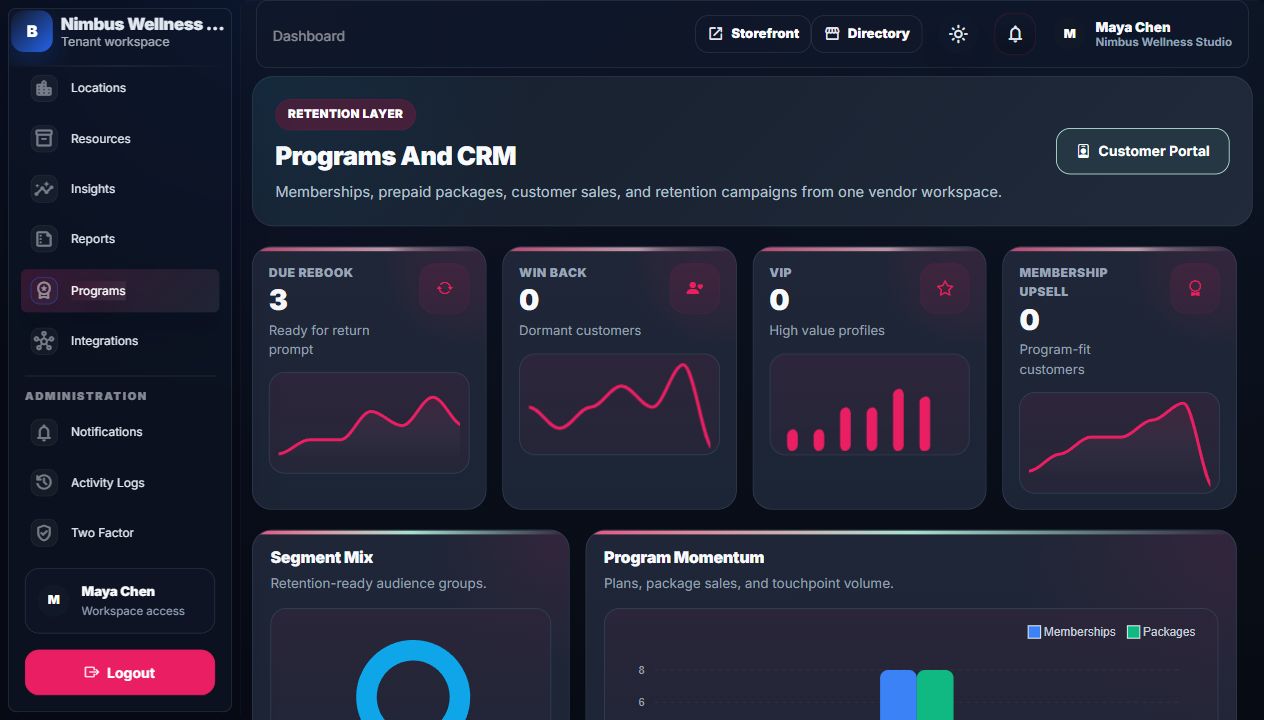
Programs turn one-time customers into repeat customers through memberships, packages, sales, and campaigns.
Program KPIs And Charts
Widget
What it counts
Source
How to read it
Why it matters
Due Rebook KPI
Customers ready for return prompt.
Customer/booking retention segmentation.
Higher number means rebooking opportunity.
Drives repeat revenue.
Win Back KPI
Dormant customers.
Customer activity history.
High number means customers are slipping away.
Launch win-back campaign.
VIP KPI
High-value profiles.
Customer lifetime value/booking history.
Shows best customers.
Protect premium relationships.
Membership Upsell KPI
Customers fit for programs.
Booking/spend/segment rules.
Shows upsell audience.
Sell memberships/packages.
Segment Mix chart
Due rebook, win back, VIP, upsell segments.
Segment counts.
Largest segment shows dominant retention task.
Focuses staff on one growth motion.
Program Momentum chart
Plans, package sales, campaigns, touchpoints.
Program and retention records.
Shows whether programs are being used.
Connects benefit setup to customer outreach.
Program Fields
Form
Field
Required?
Meaning
What changes
Common mistake
Create Membership Plan
Plan Name
Yes
Customer-facing membership name.
Creates plan available to sell/activate.
Using vague names like "Plan 1".
Create Membership Plan
Billing Interval
Yes
Monthly or annual cadence.
Plan recurring period.
Mixing monthly price with annual interval.
Create Membership Plan
Price
Yes
Membership price.
Membership amount and customer portal offers.
Expecting it to change old memberships automatically.
Create Membership Plan
Booking Discount
No
Percent discount on bookings.
Benefit matching/payment calculation.
Entering 10.00 when expecting currency instead of percent.
Create Membership Plan
Waive Deposit
No
Members can skip deposit.
Booking/payment benefit rules.
Waiving deposits for high-risk services unintentionally.
Create Membership Plan
Description
No
Short program explanation.
Public/customer offer copy.
Too much legal policy text.
Create Membership Plan
Perks
No
Line-separated benefits.
Plan perks display.
Listing perks not supported operationally.
Create Service Package
Package Name
Yes
Prepaid package name.
Creates package offer.
Name not clear about credits/service.
Create Service Package
Description
No
Package explanation.
Offer copy.
Not explaining expiry rules.
Create Service Package
Price
Yes
Package sale amount.
Package purchase price.
Price not matching expected package value.
Create Service Package
Credits
Yes
Number of visits/credits.
Customer wallet credits.
Too few credits for package name.
Create Service Package
Validity
Yes
Days until expiry.
Package expires_at on sale.
Leaving too short for customer usage.
Create Service Package
Included Services
No
Services package can cover.
Benefit applicability.
Leaving blank when package should be service-specific.
Assign Membership
Customer Name, Email, Phone
Name/email required
Customer identity.
Creates/finds customer and assigns membership.
Email mismatch prevents portal wallet match.
Assign Membership
Auto Renew
No
Renew automatically.
Membership renewal behavior.
Turning on without customer agreement.
Sell Package
Customer Name, Email, Phone
Name/email required
Customer identity.
Creates package purchase and credits.
Wrong email means credits do not show for the intended customer.
Launch Campaign
Campaign Name
Yes
Internal campaign name.
Campaign record.
Name does not explain audience or purpose.
Launch Campaign
Segment
Yes
Audience group.
Touchpoint generation target.
Choosing VIP for a win-back message.
Launch Campaign
Channel
Yes
Email, SMS, WhatsApp, database.
Touchpoint channel field.
Assuming real SMS delivery is configured in V1.
Launch Campaign
Subject
No
Message subject.
Touchpoint subject.
Blank subject for email campaigns.
Launch Campaign
Body
Yes
Message text.
Touchpoint body.
Leaving template variables confusing to customers.
AI Receptionist
Widget/field
What it means
Source
Action
Connection
Open Conversations KPI
Conversations needing attention.
Receptionist conversations.
Open inbox.
Helps staff respond to leads/support.
Booking Intents KPI
Messages likely to become bookings.
Conversation intent analysis.
Follow up or convert manually.
Feeds booking growth.
Program Questions KPI
Membership/package demand.
Conversation intent analysis.
Answer or upsell programs.
Connects assistant to Programs.
Human Follow-up KPI
Escalations needing staff.
Conversation flags.
Open detail.
Connects to TicketPro if enabled, otherwise local resolution.
Conversation Intent Mix chart
Open, booking, programs, flagged split.
Conversation stats.
Read largest workload type.
Shows AI desk health.
Reception Trend chart
Weekly leads, registered, converted flow.
Preset chart data.
Read trend direction.
Shows whether reception work is growing/converting.
Inbox item
Guest name/email, intent, confidence, summary, last message time.
Conversation and messages.
Select conversation.
Loads detail tab context.
Status badge
Open, TicketPro Handoff, or Resolved.
Conversation status.
Check whether follow-up is still allowed.
Prevents duplicate staff follow-up.
Create TicketPro Follow-up Case
Tracked support handoff.
TicketPro connection plus conversation context.
Create one case.
Stores external ticket reference and locks repeat follow-up.
Resolve Locally
Fallback when TicketPro is not active.
Internal resolution note.
Resolve once.
No external ticket and no customer message are created.
Reopen Conversation
Unlocks a locally resolved conversation.
Resolved conversation.
Reopen for one new handling action.
TicketPro-owned conversations cannot be reopened locally.
AI Usage Audit: feature keys, rules/simulator/fallback mode, latency, confidence, and redacted excerpts are visible.Suggested reply: internal staff draft only; BookFlow does not auto-send customer-facing messages.Action draft: AI prepares support/booking details, but normal BookFlow confirmation is still required.
What happens when staff handles follow-up?
TicketPro state
Visible action
Result
Customer message
Repeat protection
Configured and active
Create TicketPro Follow-up Case.
BookFlow creates a requester ticket, stores the ticket mapping, marks the conversation TicketPro Handoff, and shows ticket number/status/priority.
None from BookFlow. Staff reply inside TicketPro.
Further BookFlow follow-up is disabled.
Not configured or inactive
Resolve Locally plus Configure TicketPro link.
BookFlow stores one local resolution note and marks the conversation Resolved.
None from BookFlow.
Further follow-up is disabled until staff reopens the conversation.
Already TicketPro Handoff
Ticket details only.
Conversation remains owned by TicketPro.
Use TicketPro.
Duplicate TicketPro cases are blocked.
Already Resolved
Reopen Conversation.
Conversation can return to Open for one new handling action.
None from BookFlow.
Reopen is blocked for TicketPro-owned records.
Open flagged AI receptionist conversation before staff handles it.TicketPro active: staff can create one tracked follow-up case.TicketPro Handoff: ticket reference is visible and repeat follow-up is locked.TicketPro inactive: staff can resolve locally and open the setup path.Resolved locally: one note is saved and duplicate follow-up is disabled until reopen.
Insights
Widget/table
What it counts
Source
How to use it
Business meaning
Avg Ticket KPI
Average completed sale value.
Booking/payment analytics.
Compare with peer baseline.
Pricing and upsell health.
No-show Rate KPI
Percent no-show/risk signal.
Booking history/risk analytics.
Watch if above peer baseline.
May need deposits/reminders.
Slot Utilization KPI
Percent of usable slots filled.
Slot/booking analytics.
Low means spare capacity.
Campaign or schedule action needed.
Benchmark Position chart
Business versus peer baseline.
Benchmarking service.
Bars compare own performance to peers.
Shows strengths/gaps.
Action Queue Mix chart
Confidence, conflicts, no-show, rebook queues.
Operational queues.
Largest slice is priority queue.
Turns analytics into action.
Benchmark Coaching
Strengths and gaps.
Benchmark signals.
Read recommendations.
Explains what to improve.
Customer Portfolio
VIP, at-risk, dormant, total profiles.
Customer summaries.
Target segments.
Retention planning.
Staff Economics table
Revenue, utilization, retention, commission per staff.
Reports apply one filter set across report links, comparisons, detail rows, and CSV export.AI Report Summary: draft-only summary logged as reports.summary; source report data is not rewritten.
Report Filters
Field
Required?
Meaning
What it filters
Common mistake
Range
Yes
Last 7 days, 30 days, 90 days, or custom.
Report date window.
Choosing custom without checking start/end.
Start
No
Custom start date.
Report window lower bound.
Start after end date.
End
No
Custom end date.
Report window upper bound.
End before start date.
Location
No
Branch filter.
Bookings/revenue at one branch.
Forgetting filter remains in URL links.
Staff
No
Staff filter.
Bookings/revenue for one professional.
Using staff filter on reports where staff is not relevant.
Service
No
Service filter.
Bookings/revenue for one service.
Filtering out broader business picture.
Status
No
Booking state filter.
Only matching bookings.
Revenue may look low if completed-only/confirmed-only is selected.
Scheduled Reports And No-show Reports
Reports are no longer only a manual export surface. Owners can create scheduled report subscriptions, and operations can run due schedules through the safe scheduled-report command. No-show reports expose the risk and attendance side of retention so policy changes can be based on proof.
Area
What it tracks
Who uses it
Proof
Scheduled report setup
Report type, frequency, recipient, filters, and next run.
Owner/admin.
Reports schedules page and scheduled report subscription rows.
Scheduled run
Due report processing, completed/failed state, and run history.
No-show count, rate, related bookings, staff/service/location filters, and trend context.
Operations manager.
No-show report page and exported rows.
Review queue
Completed bookings waiting for customer feedback.
Retention/support staff.
Customer portal review action and marketplace review proof.
AI report summary
Draft-only explanation of current report movement.
Owner/admin.
AI audit log entry; report source rows remain unchanged.
Wallet Adjustments And Package Credits
Wallet adjustments are operational corrections or goodwill credits. Package credits are sold/assigned program benefits. Both must be proved in multiple places: Programs ledger, customer wallet, payment benefit summary, notifications, demo mailbox, and reports.
After Guided Meditation is completed, the customer portal shows a review action. The customer submits rating/title/body. Marketplace review data improves storefront and directory trust surfaces.
Package Credits Drive Repeat Visits
Maya sells a Six Session Recovery Pack. Credits appear in the customer's wallet. When the same customer books with the matching email/account, BookFlow can explain or apply available benefits.
No-show Risk Becomes Deposit Action
Insights flags a high-risk booking. Staff can use confidence/deposit signals to ask for payment before the appointment. Payment status then flows back to booking detail and reports.
CRM Lead Becomes Booking
A CRM lead enters the integration queue, is converted into a booking, and later appears in reports, calendar, payment, and retention actions like any normal booking.