Vendor Admin Form Reference
This page explains the create/edit/settings forms vendors use to change the business setup that customers eventually see in storefronts, booking, payment, and the customer portal.
Create Booking
| Field | Required? | User should enter/select | What it changes | Where it appears next | Common mistake |
|---|---|---|---|---|---|
| Location | Yes | Branch for the booking. | Sets booking location and timezone context. | Bookings index, calendar, customer portal. | Choosing a branch not linked to the service. |
| Service | Yes | Service being booked. | Sets duration, price, deposit/resource logic. | Booking, invoice, reports. | Creating booking before service has staff coverage. |
| Staff | No | Specific staff or auto-assigned. | Sets preferred/assigned staff profile. | Calendar event and booking detail. | Selecting unavailable staff without checking slots. |
| Booking Date | Yes | Date of appointment. | Availability lookup scope. | Scheduled booking date. | Using date without selecting a valid slot. |
| Selected Slot | Yes | Chosen slot value. | Creates scheduled_for time. | Calendar and payment due context. | Typing a slot outside availability. |
| Customer Name | Yes | Customer full name. | Booking customer fields/profile. | Bookings, customer portal, receipts. | Using staff name by mistake. |
| Customer Email | Yes | Customer email. | Matches customer account and benefits. | Portal, payment handoff, reviews. | Different email from existing wallet account. |
| Customer Phone | No | Phone number. | Booking contact data. | Admin and support context. | Leaving blank when manual confirmation is needed. |
| Customer Notes | No | Customer-facing request. | Booking notes. | Calendar/detail workflow. | Putting internal notes here. |
| Internal Notes | No | Staff-only context. | Internal booking metadata/notes. | Admin operational detail. | Putting public customer instructions here. |
Service Create/Edit
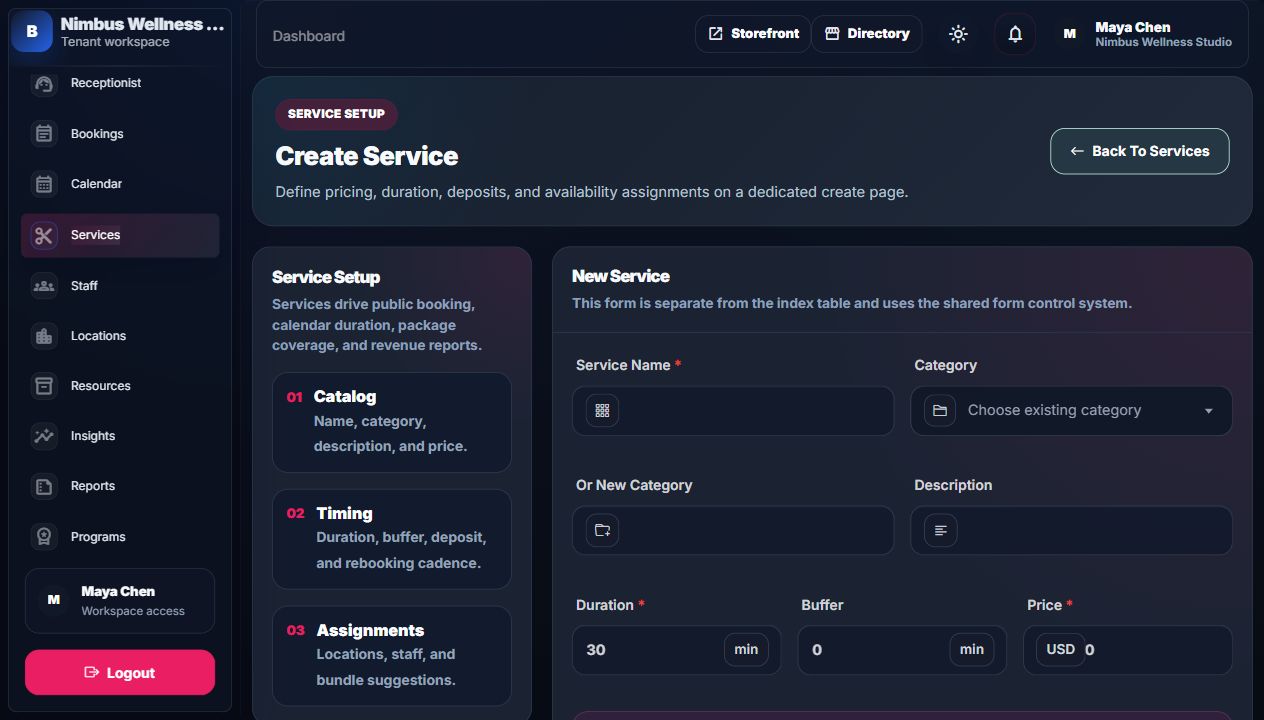
| Field | Required? | User should enter/select | What it changes | Where it appears next | Common mistake |
|---|---|---|---|---|---|
| Service Name | Yes | Customer-readable service name. | Creates/updates service name. | Storefront, booking form, reports, invoices. | Using internal shorthand customers do not understand. |
| Category | No | Existing category. | Links service to category. | Services index and storefront grouping. | Selecting a category and also typing a conflicting new category. |
| Or New Category | No | New category label. | Creates/uses a service category. | Category mix chart and service rows. | Creating duplicate categories with spelling differences. |
| Description | No | Short public/service explanation. | Service copy. | Storefront/service pages. | Overloading with internal notes. |
| Duration | Yes | Minutes the appointment takes. | Slot generation length. | Availability, calendar, service row. | Forgetting longer duration reduces available slots. |
| Buffer | No | Minutes after service before next booking. | Blocks extra schedule time. | Availability and staff calendar. | Setting no buffer for cleanup-heavy services. |
| Price | Yes | Catalog price in workspace currency. | Service price and invoice base. | Storefront, payment, reports. | Expecting old invoices to change after editing price. |
| Rebooking Interval | No | Days until customer should return. | Rebooking suggestion metadata. | Customer portal/action center. | Using too short an interval for long-cycle services. |
| Deposit | No | Percentage deposit target. | Payment/deposit guidance. | Payment page, booking confidence, admin detail. | Thinking it is a fixed amount; it is a percentage. |
| Locations | No | Branches where service is offered. | Service-location eligibility. | Booking location/service combinations. | No locations means customers may not see valid slots. |
| Assignable Staff | No | Staff who can deliver service. | Service-staff eligibility. | Availability and staff selector. | No staff means no real availability. |
| Suggested Bundle Services | No | Related services. | Service metadata for cross-sell. | Future upsell/recommendations. | Adding unrelated services confuses customers. |
| Requires manual confirmation | No | Toggle on/off. | Booking confirmation workflow. | Booking status expectations. | Turning on for all services can slow conversion. |
| Active service | No | Toggle visibility. | Public/admin booking availability. | Storefront and admin booking flows. | Inactive services are hidden from future bookings. |
Example: If Maya changes Deep Tissue Massage from 75 to 90 minutes, new available slots require a longer free window. Old booking history does not change.
Staff Create/Edit
| Field | Required? | User should enter/select | What it changes | Where it appears next | Common mistake |
|---|---|---|---|---|---|
| Name | Yes | Staff person's name. | User account and staff display. | Staff index, calendar, storefront team. | Using only first name when multiple staff share names. |
| Yes | Login/contact email. | User identity and tenant membership. | Login, notifications, staff profile. | Duplicate email with another user. | |
| Phone | No | Staff phone. | User/staff contact context. | Admin detail/support workflows. | Putting customer contact here. |
| Title | No | Public role/title. | Staff profile title. | Team carousel and staff index. | Too generic, such as "Staff". |
| Portfolio URL | No | External profile link. | Staff profile metadata. | Future/profile trust context. | Invalid URL format. |
| Bio | No | Public staff bio. | Profile copy. | Team/trust surfaces. | Writing internal HR notes. |
| Specialties | No | Comma-separated specialties. | Profile metadata. | Directory/team filtering and trust. | Inconsistent spelling across staff. |
| Languages | No | Comma-separated languages. | Profile metadata. | Customer trust/support context. | Using abbreviations customers do not know. |
| Experience | No | Years of experience. | Profile metadata. | Team trust cards. | Leaving default zero for senior staff. |
| Rating | No | Public rating value. | Profile metadata/trust signal. | Staff index and team carousel. | Manually setting unrealistic rating. |
| Reviews | No | Review count. | Profile metadata/trust signal. | Staff/team cards. | Mismatch with actual marketplace reviews. |
| Commission | No | Commission percentage. | Profile metadata/economics. | Insights staff economics. | Confusing percentage with fixed currency amount. |
| Locations | Yes | Branches staff can work. | Staff-location coverage. | Availability and calendar filtering. | No locations means no bookable coverage. |
| Services | No | Services staff can perform. | Staff-service coverage. | Availability and storefront staff selection. | Not assigning services, causing empty slots. |
| Start Time | Yes | Daily work start. | Working hours start. | Availability generation. | Using wrong timezone assumption. |
| End Time | Yes | Daily work end. | Working hours end. | Availability generation. | End earlier than start. |
| Slot Granularity | No | Slot step size in minutes. | Time slot increments. | Availability options. | Too small creates too many slots. |
| Working Days | No | Days of week staff works. | Weekly working windows. | Calendar and booking slots. | Forgetting weekend staff coverage. |
| Calendar Color | No | Event color. | Staff visual metadata. | Calendar UI. | Using colors too similar across staff. |
| Default Buffer | No | Staff-level buffer minutes. | Staff scheduling default. | Availability and staff index. | Confusing with service buffer. |
| Bookable by customers | No | Toggle public bookability. | Staff visibility/eligibility. | Storefront staff selector. | Internal staff should not be bookable. |
Example: If Avery works Monday to Friday from 09:00 to 17:00 and is assigned to Deep Tissue Massage at Downtown Studio, BookFlow can offer Avery only in those windows when no booking/time-off/resource conflict exists.
Location And Resource Forms
| Form | Field | Required? | Meaning | Where it appears next | Common mistake |
|---|---|---|---|---|---|
| Location | Name | Yes | Branch name. | Storefront location selector, admin tables, calendar. | Using city only instead of branch identity. |
| Location | No | Branch contact email. | Location index/contact context. | Using owner email for every branch. | |
| Location | Phone | No | Branch phone. | Location index/contact context. | No country/area code. |
| Location | Address Line 1 / Address Line 2 | No | Street/building address. | Location details and trust pages. | Skipping address for public branch. |
| Location | City, State, Postal Code | No | Market address data. | Directory filters and location table. | Missing city weakens directory search. |
| Location | Country Code | Yes | Two-letter country code. | Localization/address context. | Using three-letter code. |
| Location | Timezone | Yes | IANA timezone. | Availability, calendar, booking display. | Using invalid timezone text. |
| Location | Active location | No | Whether branch can be used. | Booking and scheduling flows. | Inactive branches are hidden from new booking flows. |
| Resource | Resource Name | Yes | Room/device/equipment name. | Resource index and allocation detail. | Using duplicate vague names like Room. |
| Resource | Type | Yes | Category such as room, chair, device. | Resource type chart. | Inconsistent type spelling creates messy charts. |
| Resource | Capacity | No | How many simultaneous uses it supports. | Availability resource checks. | Setting capacity 1 for shared multi-seat spaces. |
| Resource | Location | No | Branch-specific or shared pool. | Resource index coverage. | Attaching shared equipment to one branch accidentally. |
| Resource | Description | No | Internal explanation. | Resource table. | Leaving unclear for staff. |
| Resource | Eligible Services | No | Services that can consume this resource. | Availability and resource coverage chart. | Not linking a service, causing missed capacity checks. |
| Resource | Active resource | No | Whether allocation can use it. | Availability resource checks. | Inactive resources will not protect slots. |
Example: Deep Tissue Massage may require Therapy Room 1. If the room is already allocated at 10:00, the customer should not see another 10:00 slot that needs the same room.
Website Homepage And Page Forms
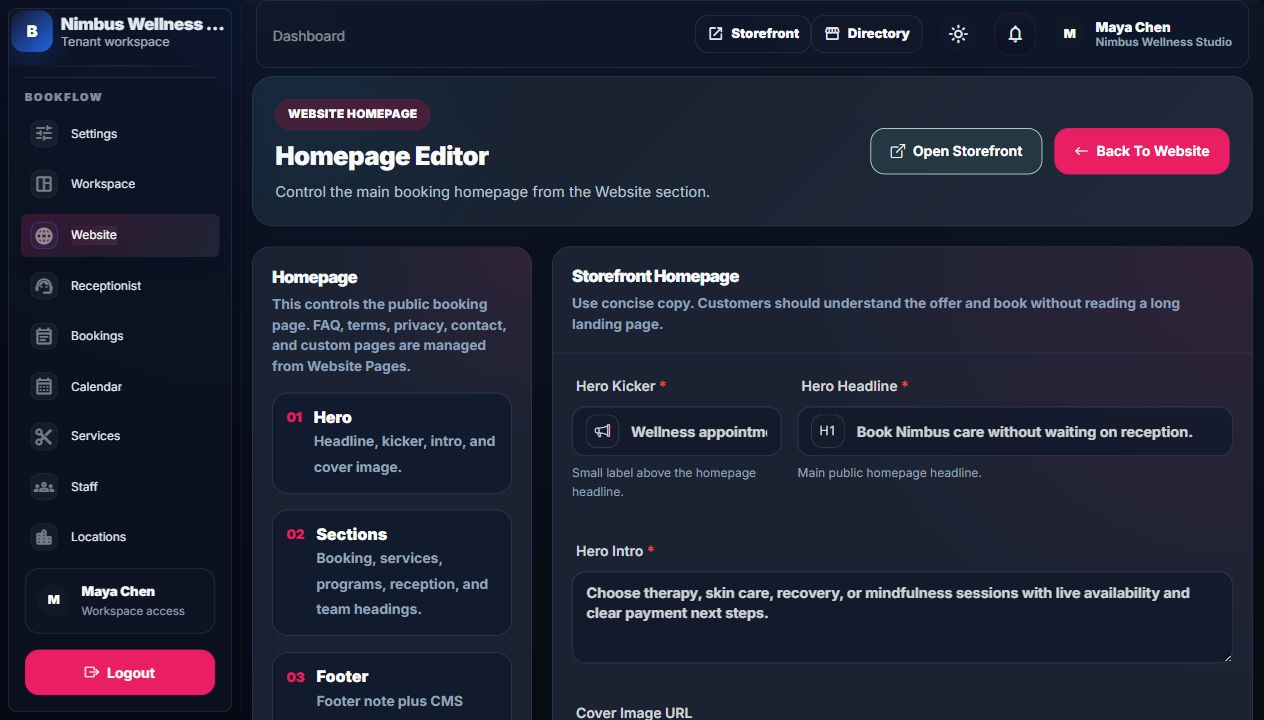
Homepage Editor Fields
| Field | Required? | Meaning | Where it appears | Common mistake |
|---|---|---|---|---|
| Hero Kicker | Yes | Small label above headline. | Storefront hero. | Writing a full sentence. |
| Hero Headline | Yes | Main customer promise. | Storefront hero. | Too long; it should be clear and short. |
| Hero Intro | Yes | Short supporting explanation. | Storefront hero. | Generic copy that does not explain the vendor. |
| Cover Image URL | No | Public image URL. | Storefront cover background. | Broken or private image URL. |
| Booking Form Heading | Yes | Heading above booking form. | Storefront booking panel. | Using marketing copy instead of direct action text. |
| Services Section Heading | Yes | Heading above service menu. | Storefront services section. | Repeating hero headline. |
| Services Section Copy | Yes | Explains how to use services. | Storefront services section. | Too long for scanning. |
| Programs Heading | Yes | Membership/package section title. | Storefront programs section. | Using if no programs exist. |
| Reception Heading | Yes | Assistant section title. | Storefront reception assistant. | Promises real human chat if only AI/demo exists. |
| Team Heading | Yes | Staff carousel section title. | Storefront team. | Too generic for the service category. |
| Footer Note | Yes | Small footer brand line. | Storefront footer. | Putting legal terms here instead of terms page. |
Website Page Fields
| Field | Required? | Meaning | What it changes | Where it appears next | Common mistake |
|---|---|---|---|---|---|
| Page Title | Yes | Public/admin page title. | Page title. | Header/footer links and page heading. | Title too long for navigation. |
| Public Slug | Required on edit; auto for create | URL path after tenant. | Public URL. | /t/nimbus/{slug} | Changing slug breaks old shared links; required slugs are locked. |
| Short Excerpt | No | Admin/search summary. | Page excerpt. | Website list and trust page summaries. | Repeating the full body. |
| Page Body | Yes | Public content with line breaks. | Page body. | Public CMS page. | Adding legal promises the vendor cannot honor. |
| Published | No | Public availability toggle. | is_published and published_at. | Public route/header/footer visibility. | Forgetting draft pages cannot be opened publicly. |
| Show In Header | No | Add link to top navigation. | Header visibility. | Storefront header. | Too many header links makes navigation crowded. |
| Show In Footer | No | Add link to footer. | Footer visibility. | Storefront footer. | Unpublishing required trust pages can remove important links. |
| Sort Order | No | Navigation order number. | Sort position. | Header/footer order. | Using same sort order for many pages. |
| Meta Title | No | Browser/search title. | Page metadata. | Browser and SEO previews. | Leaving stale title after changing page title. |
| Meta Description | No | Short search/browser description. | Page metadata. | Search previews and social snippets. | Writing more than a concise summary. |
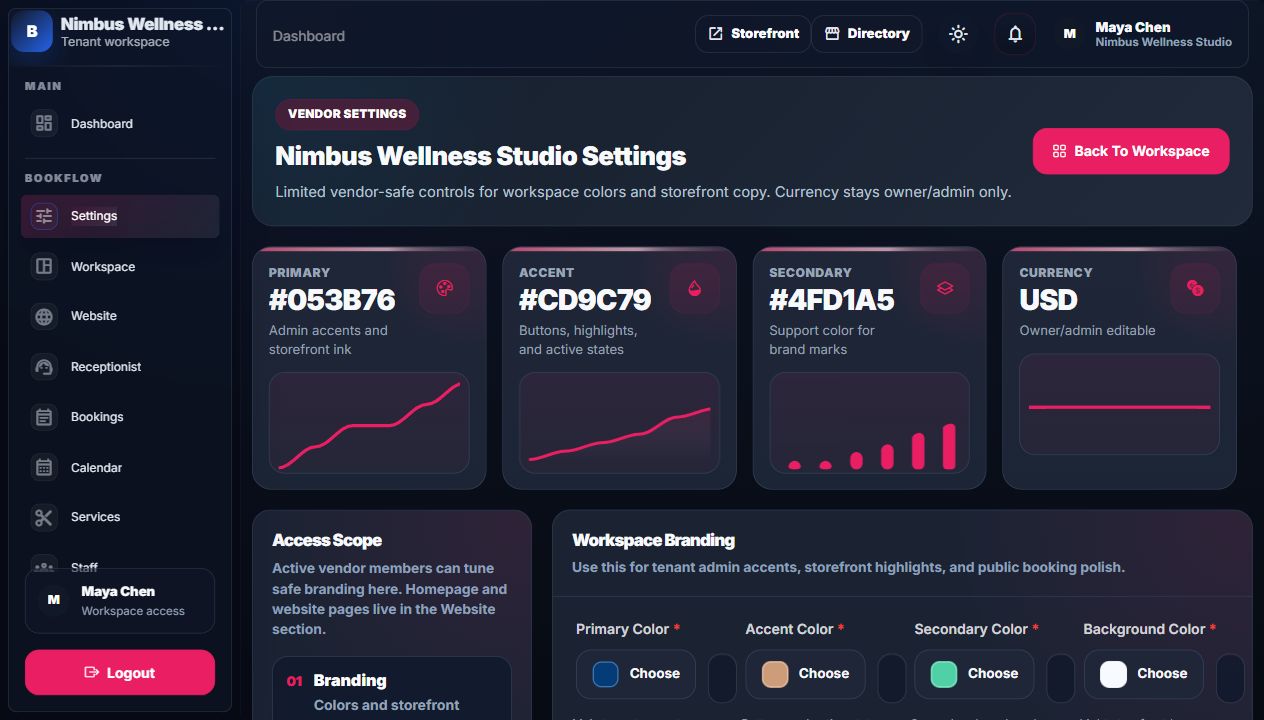
Workspace Settings
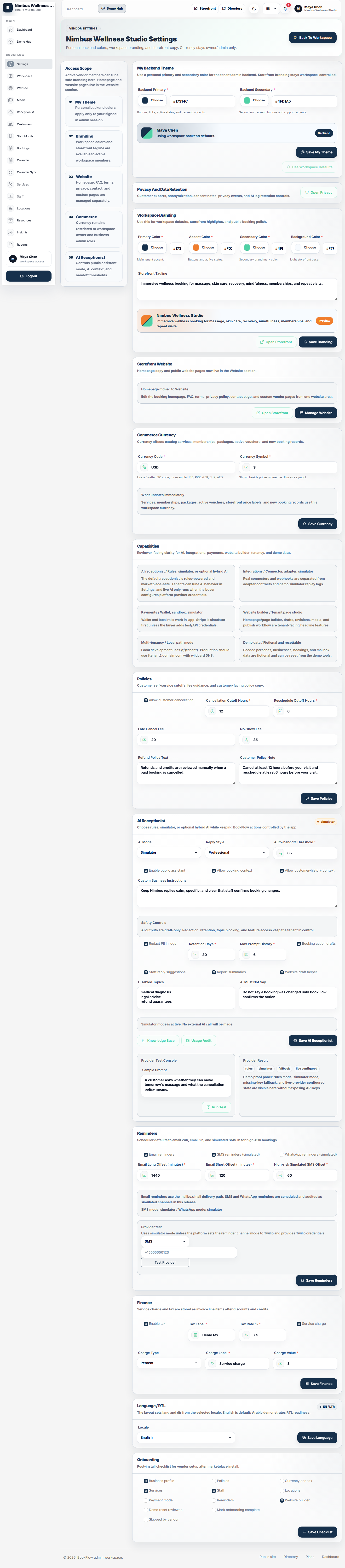
| Field/action | Required? | Meaning | Where it applies | Common mistake |
|---|---|---|---|---|
| Primary Color | Yes | Main tenant accent. | Vendor admin accents and storefront ink. | Choosing too low-contrast colors. |
| Accent Color | Yes | Buttons/highlights/active states. | Admin and storefront active UI. | Using same color as primary and losing hierarchy. |
| Secondary Color | Yes | Support brand color. | Brand marks and secondary accents. | Choosing a color that conflicts with warning/success states. |
| Background Color | Yes | Light storefront base. | Public tenant background. | Too dark or too saturated for form readability. |
| Storefront Tagline | No | Business description/public line. | Storefront/directory copy. | Writing a large paragraph. |
| Currency Code | Owner/admin only | Three-letter workspace currency. | Services, memberships, packages, vouchers, new bookings. | Expecting historical financial records to be rewritten. |
| Currency Symbol | Owner/admin only | Displayed symbol. | Price labels where symbols are used. | Using code and symbol inconsistently. |
| Open Storefront | No | Preview public site. | Tenant public URL. | Viewing before saving changes. |
| Manage Website | No | Open Website section. | Homepage and CMS pages. | Looking for homepage fields in Settings after they moved. |